
You know what’s funny? I spend most of my days helping businesses pick the right CRM, and the conversation almost always starts the same way: “We know we need something, but everything we look at feels… overwhelming.”
And I get it. When you’re running a small business, CRM research can feel like shopping for a car when all you need is a bicycle. Salesforce feels like you need an engineering degree just to log in. HubSpot assumes you’ve got a whole marketing department. Even the platforms that claim to be “simple” come loaded with features you didn’t know existed and definitely don’t need.
That’s exactly why Bigin CRM caught my attention. Here’s a CRM that actually seems to understand what small businesses are going through – that moment when you realize sticky notes and Excel aren’t cutting it anymore, but you’re not ready for enterprise-level complexity.
By the end of this article, you’ll know exactly whether Bigin CRM fulfills its promise and could be the ultimate small business CRM. I will cover:
- Who Bigin CRM is for.
- What use cases it covers.
- Its user interface.
- Functionality.
- Ease of implementation.
- Customer support.
- Its marketplace.
- Product quality.
- And many more points.
Ready to see if Bigin CRM is the right fit for your business? Let’s dive in!
Company & Positioning
About the Company
Bigin CRM emerges from the Zoho universe, which immediately tells you something important about its DNA. If you’ve ever worked with Zoho products, you know they have a very particular philosophy: build comprehensive business software that’s accessible to companies who can’t afford enterprise solutions, but don’t necessarily worry about making them very polished.
Zoho has been quietly building an empire of interconnected business applications for over two decades. While Salesforce dominated headlines and HubSpot captured startup mindshare, Zoho focused on creating an ecosystem where small and medium businesses could run their entire operation through integrated apps – CRM, accounting, project management, email marketing, and so on.
Bigin CRM represents their attempt to distill that ecosystem thinking into something even more accessible. It’s positioned as the “simplified CRM” within their portfolio, sitting alongside the full-featured Zoho CRM like a younger sibling who went to community college instead of pursuing a PhD.
What’s interesting about Zoho as a company is their commitment to affordability without sacrificing fundamental functionality. They’re not trying to be the prettiest or most intuitive – they’re trying to be the most practical for businesses that need real tools but can’t justify enterprise budgets. Which brings me to a very important question – who is Bigin CRM for?
Target Audience
Imagine you’re running a small business – maybe a consulting firm, a local service company, or a startup that’s moved beyond the “founder’s personal network” stage of customer acquisition. You’ve been tracking customers in Excel, sticky notes, or that informal mental system that worked fine when you had five clients.
You know you need to get systematic about customer management, but when you research CRM solutions, everything feels overwhelming. Salesforce looks like it requires a computer science degree. HubSpot seems built for companies with dedicated marketing teams. Even the “simple” solutions assume a level of sales process sophistication that you haven’t developed yet.
Bigin CRM targets that exact moment of recognition – when you realize you need systematic customer tracking but don’t know where to start and can’t afford to get it wrong.
It is my personal speculation, but I think the ideal Bigin CRM user is probably managing somewhere between 10 and 500 customer relationships, has a team of 1–10 people who need access to customer information, and wants to implement basic sales process tracking without hiring consultants or spending months in configuration.
They’re not trying to capture enterprise clients who need complex territory management or sophisticated reporting hierarchies. They’re targeting businesses where the primary CRM question is “did we follow up with this person?” rather than “what’s our quarterly sales velocity by product line?” Which brings me to my next point – what’s the use case fit, or in other words, for what type of businesses Bigin is designed for.
Use Case Fit
So here are the criteria, or at least how I see it:
- Transitioning from Informal Tracking: You’re transitioning from informal customer tracking (Excel, notebooks, memory) to systematic CRM for the first time. Bigin CRM provides just enough structure to organize your customer relationships without overwhelming you with options you don’t understand yet.
- Straightforward Sales Process: Your sales process is relatively straightforward – you meet prospects, qualify them, propose solutions, and either close deals or they say no. You don’t need complex multi-stage nurturing campaigns or intricate approval workflows. Though you could have many stages with Bigin, the point is you don’t have a sophisticated sales process.
- Basic Collaboration: Your team needs basic collaboration around customer information. Everyone should see the same contact details, know who talked to whom when, and understand what the next steps are for each opportunity.
- Practical Phone Integration: You want phone integration that actually works without enterprise-level complexity. Bigin CRM’s telephony features are genuinely impressive for the price point.
Which brings me probably to the most important point in discussing CRM systems – User Interface.
Experience & Adoption
User Interface
When you first log into Bigin CRM, you’re greeted with a refreshingly clean pipeline view – all your opportunities split by stage in that familiar Kanban-style layout that’s become the standard across the industry. It’s immediately recognizable if you’ve used any modern CRM system.
What strikes me most about the interface is its deliberate simplicity. There’s something almost zen-like about how stripped down everything feels. You’ve got your contacts on the left, companies, products, and that’s pretty much it. No overwhelming menus, no feature bloat – just the essentials.
But here’s where my observations get interesting. While working with the system, I started noticing small friction points that accumulate over time. When I click to open a contact – let’s say Ashley Collins – the information doesn’t organize itself into clear, digestible tiles like I’ve grown accustomed to in Salesforce or Pipedrive. Instead, everything flows together: basic info, tags, description, related contacts, company details. It’s not broken, but it lacks that visual hierarchy that helps your brain quickly parse different types of information.
However, what I don’t like is that Bigin is not using modal windows like most modern software systems are doing when it comes to new record creation. Instead, they’re opening windows (if I could call them windows) to the side, which adds a bit of a learning curve. It’s not very intuitive, and especially if you’re on a bigger screen – you’ll have to do a lot of seeking with your eyes over the screen to find elements. Normally they should all appear at the center of the screen; that way, no matter what machine you’re using, all user interface elements are more or less in the same place. You get used to them and that makes the system easier to use.
Which brings to the next point of my review – Out-of-the-box functionality. Or in other words, what Bigin has to offer without additional add-on installation.
Out-of-the-box Functionality
Bigin CRM comes with exactly what you’d expect from a modern CRM – pipeline management, contact and company tracking, activities, calendar integration, and a dashboard. However, they have a very specific approach when it comes to creating pipelines, which I don’t necessarily understand.
You can create standard pipelines for different business models – say B2B versus B2C sales. But then they introduce this concept of “sub-pipelines.” After some exploration, I realized sub-pipelines let you reuse existing stages while creating slightly different workflows. I’m not sure if it’s genius or dumb; I just couldn’t think of use cases where this would help instead of complicate things.
Next, the compliance features. HIPAA and GDPR compliance are built right in – not bolted on as an afterthought. For small businesses that need to handle sensitive data, this removes a significant barrier to entry.
When it comes to setting up permissions, the system is extremely straightforward. You only have so many options, but this is understandable considering who their target audience is. Small businesses don’t need complex configuration options. At least, I wouldn’t want them.
What did impress me was how easy I could integrate the phone into Bigin. I connected my telephony provider (I use a somewhat niche service called TelTel), and within the interface, I could simply click a phone number and my system would ring. During calls, I could take notes directly in the CRM. It’s the kind of seamless integration that makes you wonder why other systems make this so complicated.
Which brings me to my next point: how quickly you could get up and running, or in more fancy terms – Time to value.
Time to Value
This is where Bigin CRM truly shines. If you know what you’re doing with CRM systems, you can genuinely be up and running in a single day. The bottleneck isn’t the technology – it’s the business decisions about how you want to structure your sales process.
I imported demo data using ChatGPT to help generate realistic opportunity names, and the migration process was straightforward. The real time investment comes from thinking through questions like: What should we call our pipeline stages? How do we want to track different types of customers? These are strategic questions that every business needs to answer regardless of which CRM they choose.
For someone completely new to CRM systems, I’d estimate maybe two days total – one day for setup and import, another day for the team to click around and get comfortable. Compare that to enterprise systems where you’re looking at weeks or months of implementation, and the value proposition becomes clear. Which is a great time to talk about user adoption, or in other words – how easy it is to onboard users into the system and how likely they will be using it.
User Adoption
The simplicity that defines Bigin CRM’s interface also drives its adoption story. There’s genuinely very little to learn. Your team won’t need extensive training sessions or reference manuals. The core functionality is intuitive enough that most people can figure it out through exploration.
However, I did notice some patterns in daily usage that might create friction points. When creating tasks, for instance, you have to manually type “follow-up” or “call” instead of selecting from pre-populated options. It’s a small thing, but when you’re in that flow state – moving from deal to deal, task to task – these little moments where the system doesn’t anticipate your needs can break your rhythm. In Salesforce, for example, this is realized via a hybrid field, where you could either select from a list of pre-defined task subjects or enter your own task subject. I like it much more.
Next, the comment system requires explicitly clicking save rather than just hitting enter, which feels oddly formal for what should be quick note-taking. Again, not a dealbreaker, but it’s the kind of detail that separates systems that feel intuitive from those that feel merely functional.
I’m not sure how much of a dealbreaker these minor issues would become, since I do work with a lot of different software, I can tell that this would have annoyed me to the point of frustration and I, personally, would want to switch to something that is better thought out. However, in general, I think this system could get a very decent user adoption thanks to its simple, I’d say even primitive, interface. Which brings me to my next point – Mobile experience.
Mobile Experience
Bigin CRM’s mobile app nicely complements the desktop version, and even expands capabilities. I would say their app is even better than Salesforce’s mobile offering.
The interface translates well to mobile, maintaining a clean, uncluttered feel that works on small screens. You can manage your pipeline, update deals, create tasks, and access contact information without feeling like you’re using a cramped desktop interface.
One feature that caught my attention was the handwritten note scanning. The app can convert handwritten notes to text, though the accuracy varies dramatically depending on your penmanship. With printed text, it works remarkably well. With my handwriting… let’s just say the feature has room for improvement. However, again, I think on iPhone that app uses Apple intelligence features, which is beyond Bigin’s scope, so fingers should probably be pointed at Apple if something is not working well here.
The mobile experience does inherit some of the desktop version’s quirks. Occasionally, buttons become unresponsive, requiring you to close and reopen the app. It’s not frequent enough to be unusable, but it’s noticeable enough to mention.
What I appreciate about the mobile app is that it doesn’t try to cram every desktop feature into a phone interface. Instead, it focuses on the core activities that sales teams actually need when they’re away from their computers: checking pipeline status, updating deal stages, and capturing quick notes or tasks.
Documentation & Support
Documentation
A very important aspect when I look at any software product is its documentation. It’s a very good measurement of the level of support of the product.
Well, for Bigin CRM – the documentation exists. But it’s very much what you’d expect from a simplified system – basic, functional, and focused on the most common use cases.
Most of the documentation reads like an extensive FAQ, which makes sense given the target audience. You’ll find answers to questions like “How do I customize my pipeline?” and “Can I integrate with Google Calendar?” The answers are usually straightforward and include screenshots.
What’s interesting is browsing through the question categories. The numbers tell a story: Getting Started has 4 articles, Explore Settings has 13, but Mobile App FAQ has 683 entries. That’s a massive disparity that suggests either the mobile app has significantly more complexity (or issues) than the desktop version, or users are simply more confused about mobile functionality.
From a technical perspective, the API documentation exists but it’s sparse. If you’re planning to build custom integrations or do anything more sophisticated than the standard use cases, you’ll probably find yourself filling in the gaps through trial and error. For a system positioned as simple and straightforward, that’s probably acceptable – most users won’t need extensive technical documentation.
For me, as someone who’s implemented dozens of CRM systems, I don’t actually need extensive user documentation for basic functionality. What I need is clarity about limitations, edge cases, and integration capabilities. Bigin CRM’s documentation covers the basics adequately, but don’t expect deep dives into complex scenarios, which may become an issue if you’re looking to develop complex customizations. But again, considering the target audience, I don’t think this is an issue.
Which brings us to customer support of Bigin.
Customer Support
This is where I have to draw on my broader experience with Zoho as a company, and honestly, it’s not particularly encouraging. My interactions with Zoho support over the years have followed a consistent pattern: they respond to tickets promptly, but there’s often a disconnect between acknowledging your question and actually solving your problem.
It’s like having a conversation with someone who’s technically answering your questions but completely missing the underlying issue you’re trying to resolve. They’ll provide steps to reproduce a problem you’ve already reproduced, or suggest solutions that don’t address the root cause you’ve identified.
What’s particularly frustrating is when you encounter what seems like a clear bug (and trust me, you will encounter bugs), the support response tends to focus on workarounds rather than fixes. It’s as if the support team is trained to close tickets rather than resolve actual issues.
I haven’t tested Bigin CRM’s specific support channels extensively, but based on the broader Zoho ecosystem and what I’ve read in various Reddit threads and review sites, the pattern seems consistent across their products. Multiple users report similar experiences – responsive but not particularly effective support.
For basic questions that can be answered through documentation, you’re probably fine. For anything requiring actual problem-solving or bug resolution, I’d recommend having realistic expectations about what support can actually accomplish for you. Which brings me to an alternative way of solving problems, and that is community.
Community & Learning Resources
And let’s be honest about this: there isn’t really a community to speak of. I spent time exploring their community forums, and what I found was essentially a ghost town with occasional tumbleweeds blowing through.
The latest discussion I could find was a month ago at the time of my review. The pattern seems to be that maybe once every month or so, someone posts a question, and then… silence. Most of the “community” activity consists of announcements from Zoho’s development team posting to an audience that doesn’t seem to be there.
This is in stark contrast to systems like HubSpot or even Salesforce, where you’ll find active communities sharing tips, workarounds, and best practices. With Bigin CRM, you’re essentially on your own when it comes to learning from other users’ experiences.
The learning resources situation is similarly sparse. There are no comprehensive video tutorials, no third-party training courses, no user groups or meetups. It’s a “grab the system and figure it out yourself” approach, which aligns with the overall philosophy of simplicity but can leave you feeling isolated when you do encounter challenges.
In some ways, this makes sense given the target audience. If you’re a small business just starting with CRM, you probably don’t need a vast library of advanced tutorials or a thriving community of power users. You need something that works out of the box with minimal fuss.
But it does mean that as your needs evolve or you encounter edge cases, you’ll be largely dependent on official support channels or your own problem-solving abilities. There’s no crowd-sourced wisdom to tap into, no community-generated workarounds for common issues, no shared best practices from similar businesses.
For a starter CRM, this might be acceptable. For anything beyond basic usage, the lack of community resources becomes a real limitation that you’ll need to factor into your decision-making process.
Which is a great time to dive a bit deeper and talk about the technical implementation of the Bigin CRM.
Technical & Strategic Fit
Integrations
Let’s start with integrations. Here’s where I nearly lost my mind, and it perfectly illustrates the Zoho approach to software development. I wanted to create a simple automation: website contact form → Slack notification → Google Sheets backup → Bigin CRM deal creation. Straightforward stuff that any modern CRM should handle.
I fired up Make.com (one of the most popular automation platforms) and started building the workflow. I could create companies, I could create contacts, but when I looked for “Create Deal”… it wasn’t there. Instead, I found something called “Create Pipeline.”
Now, if you’ve worked with CRMs before, you know that a pipeline is the overall sales process structure, while a deal is an individual opportunity within that pipeline. It’s like the difference between “sales process” and “specific sale.” But apparently, whoever built the Bigin CRM integration with Make.com decided these terms were interchangeable.
After some frustrated clicking around, I discovered that “Create Pipeline” actually does create a deal. It’s just named completely wrong. This perfectly encapsulates what I call the “Zoho developer disconnect” – it feels like the people building integrations are completely disconnected from real life and their users. They don’t have a clue about what they are building.
However, once you decode their unusual naming conventions, the integrations actually work quite well. The email integration, in particular, impressed me. You get read receipts, email tracking, and shared inbox functionality that lets teams collaborate without sharing login credentials. It’s actually, if not better, then at least the same level as Salesforce’s email integration, which is saying something.
The phone integration deserves special mention. I connected my telephony provider, and within minutes I could click phone numbers in the interface and have my system automatically dial. During calls, I could take notes directly in the CRM, and call recordings were automatically attached to the contact record. This level of seamless integration usually requires expensive enterprise setups.
However, finding those call notes later required archaeological skills. They’re buried deep in the activities section rather than being prominently displayed where you’d logically expect them. Which again, is a testament to the Zoho company’s developers. Which brings me to discussing the ecosystem of Bigin.
Ecosystem (Consultants, Apps)
The Bigin CRM ecosystem is essentially the broader Zoho universe, which is both a blessing and a curse. On the positive side, you get access to an incredibly comprehensive suite of business applications: invoicing (Zoho Books), project management (Zoho Projects), email marketing (Campaigns), forms (Zoho Forms), digital signatures (Zoho Sign), and dozens more.
But here’s where it gets complicated: the Zoho ecosystem has a very specific philosophy about how business software should work, and you’re essentially locked into their way of thinking. Each individual app ranges from “pretty good” to “why did they build it this way?” and you can’t easily substitute best-of-breed alternatives without losing the integration benefits.
When it comes to consultants and implementation partners, the Bigin CRM market is virtually non-existent. This isn’t necessarily a bad thing given the system’s simplicity, but it does mean you’re largely on your own for anything beyond basic setup. For complex business requirements or custom integrations, you’ll need to either figure it out yourself or potentially look at more robust alternatives. On the positive end – Bigin is clearly built with Zoho CRM under the hood. So technically, you could migrate in a couple of clicks and get access to the vast ecosystem of Zoho CRM developers.
The app marketplace is limited compared to platforms like Salesforce or HubSpot. Most of what you’ll find are integrations with other Zoho products rather than third-party solutions that could extend functionality in meaningful ways. But again, it’s hard to look at Bigin without keeping the fact that it’s Zoho CRM in mind. Which is a good time to talk about scalability. Or in other words, how well the system could grow with you.
Scalability
And the answer is not very straightforward. On one hand – You get exactly what you see – four core objects (pipelines, contacts, companies, products) and basic functionality around them. There’s no path to grow the system as your business becomes more sophisticated.
The data model is intentionally simple: deals connect to contacts, contacts connect to companies, and that’s about it. You can’t create custom objects like “Projects” or “Support Tickets” or “Partner Relationships.” You can’t build complex workflows that span multiple business processes. You can’t create sophisticated reporting hierarchies or custom dashboards that provide executive-level insights.
This isn’t a criticism – it’s by design. Bigin CRM is explicitly positioned as a starter CRM, and in that context, the lack of scalability makes perfect sense. The system succeeds precisely because it doesn’t try to be everything to everyone.
But it does mean that successful businesses will inevitably outgrow Bigin CRM. When that happens, you’re looking at a migration to either Zoho CRM (the full version) or a completely different platform. The good news is that the data export process should, in theory, be straightforward, so you’re not trapped. Now before we jump to the next section, let’s briefly talk about customization.
Customization
Bigin CRM offers a simple, fixed structure: Deals, Contacts, Companies, and Products. You can customize fields (up to 50 per object) and tweak layouts, but you can’t create new objects or complex relationships. This keeps things easy to set up and hard to overcomplicate – ideal for small teams just getting started. However, if your process requires custom objects or advanced modeling, you’ll hit limitations fast. Which is a great time to talk about Bigin’s product quality.
Quality (Bugs, Feel)
This is where my enthusiasm for Bigin CRM’s value proposition hits a brick wall. The system feels like it was built by different teams who never talked to each other, tested by people who’ve never used a CRM system, and deployed without anyone doing a final quality check.
I’m not exaggerating when I say I encountered bugs within minutes of starting my review. Screens that wouldn’t load, buttons that didn’t respond, search functions that couldn’t find records I knew existed. The Zoho Notebook feature simply refused to open, throwing error messages in a completely empty system with maybe 70 total records.
These aren’t edge cases or complex scenarios – this is basic functionality failing under normal usage conditions. I’m using Chrome (the world’s most popular browser) on a modern computer with a fast internet connection. There’s no technical reason for this level of instability.
What’s particularly frustrating is the unpredictability. Sometimes features work perfectly, sometimes they don’t work at all, and sometimes they work but in unexpected ways. You develop workarounds and defensive habits – like refreshing pages after certain actions or double-checking that data actually saved.
The mobile app inherits many of these quality issues. Buttons randomly become unresponsive, requiring app restarts. Features that work on desktop sometimes fail on mobile for no apparent reason.
From a business perspective, this level of quality creates a hidden cost. Your team spends time troubleshooting instead of selling. You lose confidence in your data because you’re never quite sure if that missing record is actually missing or just hiding behind a bug.
In 2025, with the level of polish we’ve come to expect from business software, this feels amateur. It’s the kind of quality you might accept from a free tool you found on GitHub, not from a commercial product that businesses depend on for revenue-critical processes.
The value proposition is compelling – you get a lot of functionality for very little money. But you pay for that savings in frustration, workarounds, and the constant nagging doubt about whether your business system is actually working correctly. Which is a great time to talk about costs.
Pricing & Value
Pricing
Bigin CRM’s pricing is one of its strongest selling points. You can start completely free – not a trial, but a full CRM for up to 500 records. Once you need more, plans start at just $7/month (annual) or $9/month (monthly) per user, with the top tier maxing out at $18/month. This makes it accessible for any small business, without hidden costs or complicated pricing schemes.
The free plan is genuinely usable, and the paid plans scale logically with added features like automation, more storage, and more custom fields. There are no per-contact fees, no overage charges, and no forced upsells – just clear, predictable pricing.
Cost of Ownership
Beyond subscriptions, Bigin keeps costs low by design. You don’t need consultants, admins, or even training – most users can get started in minutes. It’s a plug-and-play CRM for small teams.
However, while monetary costs are low, there are hidden productivity costs. Minor bugs, interface quirks, and limited functionality can slow down your team. A few minutes lost per user per day adds up – and over time, that can eat into your operational efficiency.
For early-stage companies, these trade-offs are usually worth it. But as your business grows, those frictions may outweigh the savings. Bigin CRM is a “good enough” solution that helps you get started quickly and cheaply, but it may not scale with more complex needs.
The upside is that you can test and learn with almost no financial risk—and upgrade when the value of more powerful tools becomes obvious. Which brings me to the final part of this article.
Personal Take
After spending a couple of days with Bigin CRM – importing real data, testing integrations, and pushing the system through daily workflows – I need to answer the question that matters most: Would I actually want to work in this system?
Here’s the honest answer: No, I wouldn’t want to work in Bigin CRM day-to-day. And it breaks my heart to say that, because I can see exactly what they were trying to accomplish.
Let me explain why this is such a conflicted response for me.
On paper, Bigin CRM represents everything I believe a starter CRM should be. It’s simple without being simplistic. It’s affordable. It covers the essential functionality that 90% of small businesses actually need without overwhelming them with enterprise features they’ll never use.
The phone integration genuinely impressed me – clicking a contact and having my system automatically dial is the kind of seamless workflow that usually requires expensive enterprise setups. The email tracking works better than systems costing ten times more. The compliance features are built-in rather than expensive add-ons. From a feature perspective, they’ve made thoughtful choices about what to include and what to leave out.
But here’s the thing – after fifteen years of working with CRMs that actually run smoothly, I’ve gotten a bit spoiled.
When I click something, I expect it to respond. When I search for a contact, I expect to find them if they exist. When I save a note, I expect to locate it later without playing digital archaeology. These aren’t unreasonable expectations in 2025 – they’re basic table stakes for business software.
Bigin CRM fails these fundamental reliability tests in ways that compound over time. It’s not just the individual bugs – though there are plenty. It’s the constant mental overhead of never quite trusting your tools. As I said, you develop defensive habits: refreshing pages after certain actions, double-checking that data actually saved, avoiding features that feel unreliable.
This creates a productivity tax that’s hard to quantify but impossible to ignore. Every moment spent working around the system is a moment not spent focusing on customers, building relationships, or closing deals. In sales, momentum and flow state matter enormously, and unreliable tools are momentum killers.
If I were running a bootstrapped startup with no CRM experience, Bigin CRM would be a smart way to start. It’s affordable, easy to set up, and helps you understand what CRM adoption really looks like.
The system’s simplicity forces clarity – there’s no room to overbuild, so you focus on what matters: tracking and following up with customers. As a learning tool, it’s great.
But it’s not built to scale. The flaws – bugs, quirks, and missing polish – start to grate once you’ve seen what reliable software can do. So, no, I wouldn’t choose to work in it long-term. But for small teams testing the waters, Bigin CRM removes the usual cost and complexity barriers – and that makes it worth recommending in the right context.
Just don’t expect to love it. Expect to learn from it.
Final Thoughts
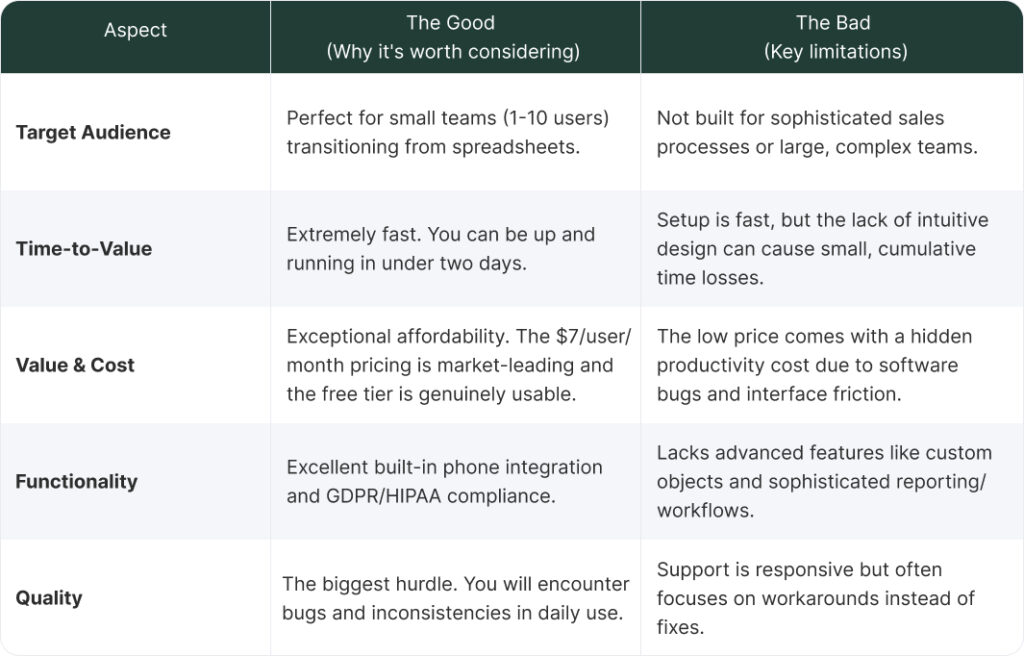
To wrap up this extensive review, let’s quickly summarize the key takeaways to help you decide if Bigin CRM is right for your business:
If you’re still struggling to determine whether Bigin is a suitable solution for your business or if you need something more robust like HubSpot, or Salesforce, we can help. Contact us at Muncly for a consultancy session. We will evaluate your current processes and team size to help you cut through the marketing noise and find a CRM system that meets your needs today and tomorrow!