
HubSpot is heavily promoting its CRM. It’s free, it’s integrated with marketing, and the company alleges you can keep everything in one place. In some areas, it surprised me; in others, it disappointed; and in some, it simply confirmed biases I already held. So, what exactly is HubSpot? Is it a CRM? Is it a marketing tool? Is it an all-in-one platform?
In this article, I’ll cover what HubSpot is, the company behind it, and who this product is really designed for. I’ll explore the user experience, interface, and how easy (or hard) it is to implement. I’ll walk you through key features and show you the mobile app. We’ll look at product support – documentation, community, and available consultants.
For the more technical folks keeping up with the review, I’ll do a deep dive into integrations, data models, and scalability. And finally, I’ll tackle HubSpot’s pricing and total cost of ownership – which, by the way, is surprisingly complex because they have a truly complex billing model. At the end, I’ll give you my honest take on whether I’d actually use this thing.
So, ready to see if HubSpot really lives up to the hype? Let’s dive in and start with the context!
Company and Product Positioning
About HubSpot
HubSpot was founded in 2006 by Brian Halligan and Dharmesh Shah. They went public in 2014, and you can really tell the difference between publicly traded companies and those that aren’t; we’ll touch on this later in this article.
HubSpot basically popularized inbound marketing – the idea where you create content that naturally attracts customers to you. I’m not saying they invented it, but they definitely helped make it mainstream. I’ve actually learned a lot from their content over the years; they really know how to create valuable educational material.
HubSpot positions itself as a “customer platform” – essentially a hub where you can manage all your customer interactions in one place. For me, HubSpot was always a marketing-first platform, yet I was curious to see what it looked like from the inside. In many ways, I’m writing this article as much for myself as for you. But let’s see. This brings me to HubSpot’s positioning, or in other words – who this product is for.
Who is the Product For
HubSpot targets small to medium-sized companies, typically with 10–200 employees. They work especially well for companies in:
- B2B SaaS companies – businesses that sell software to other businesses.
- Professional services – agencies, consultants, and IT service providers.
- Hardware companies – think computer components, camping gear, and physical products.
- Education and nonprofits – they even have special features just for educational institutions.
- E-commerce and direct-to-consumer brands.
What ties all these companies together is one thing: many of them rely heavily on marketing automation. And that’s exactly where HubSpot shines. But probably even more important is who HubSpot is not for.
Well, HubSpot isn’t a good fit for:
- Large enterprise corporations, because it lacks customizability.
- Highly regulated industries like banking, healthcare, or insurance.
- Industries that need heavily customized data models (like car dealerships).
The thing with HubSpot is it’s what we call “opinionated software.” Think of it this way: you could hire a compliant employee who just follows orders, or you could hire a talented expert who has strong opinions about how things should be done. HubSpot is like that expert. It has built-in logic and processes that you need to follow to use it successfully. There are many situations where it basically dictates how you should handle your sales and marketing processes. Which is a great time to cover HubSpot’s User Interface.
Experience and Adoption
User Interface
The first thing you notice is how different the workspace feels from traditional CRM software. A lot of companies are moving in this direction now, but it’s still pretty unique.
You’ve got these main sections: CRM, Marketing, Content, Sales, Commerce, and Service. What’s interesting is that what they call “CRM” is really just a handful of basic entities – contacts, companies, leads, deals, and tickets. This confused me at first. Everything else is organized by function rather than by traditional CRM logic.
When you go into the CRM section, you see these tables, but honestly, they don’t feel like they’re designed for daily work. This tells you something important about HubSpot’s philosophy – they think about CRM work organization very differently.
They have a separate Sales module with different zones: target accounts, documents, meeting scheduler, sequences, and activity feed. The idea is that you jump between these specialized modules to get things done. The one exception is deals, which uses the familiar kanban board layout where you can manage your pipeline.
When I first started this review, I had a hard time figuring out how everything worked because the interface is so different. I can’t say if it’s better or worse – it’s just different from what most people are used to. Traditional systems are built around logical entities. In sales, you typically have accounts, contacts, deals, and proposals. But here in the sales section, you see… lists. Why lists? What’s with all the lists?
The answer is simple: HubSpot isn’t really a traditional CRM system. It’s not a system where you look up a contact and make a call. HubSpot is designed to build sales funnels and map out customer journeys. That’s why it looks so different.
Overall, the interface is clean, well-organized, and pretty intuitive once you get the hang of it. I didn’t encounter any bugs or lag – everything feels polished and runs smoothly. It’s clean, professional, and unobtrusive. You could work in this system all day without it getting in your way. But here’s the catch: you’ll need to invest time learning how to use it properly. Which brings me to a very important question – how easy or hard is it to implement HubSpot?
Ease of Implementation
HubSpot is one of the few CRM systems that charges a mandatory onboarding fee when you buy a subscription. You literally have to pay them to train you and help you set everything up.
This tells you something important: they know their product is complex and has a steep learning curve. The onboarding fee serves another purpose too – once you’ve paid that extra cost, you’re more committed to making it work.
From a data import and setup perspective, it’s pretty complex. When you’re importing data, you need to understand how their data models work and how relationships between different objects are structured. It’s not super intuitive in terms of ease of use. This is the trade-off you get with flexibility, though I’m not entirely convinced HubSpot actually provides that much flexibility.
I’d rate HubSpot as having medium-to-high implementation complexity and probably high user adaptation complexity. It’s just very different.
There are some bright spots though. They have this cool feature called Fill Rate under Data Management → Properties. It shows you how well your fields are populated and can help you identify unnecessary fields. Which is a big advantage for user adoption in the future.
HubSpot offers industry templates for real estate, healthcare, and education. You can use these templates to get a data model set up right out of the box. They also have this AI feature called Breeze that can supposedly generate data models for specific use cases. In practice, it doesn’t create truly custom models.
For example, if you’re a car dealer and ask Breeze to set up your system, it won’t suggest creating a “vehicle” object, even though that’s essential for automotive CRM systems. HubSpot does allow custom objects, but only on their Enterprise plan; more on this in my technical review part. Which brings me to the feature highlights section of this review.
Feature Highlights
And let’s start with what they call ABM, or Account-Based Marketing. This isn’t just a feature. It’s a whole philosophy built into their system. ABM is marketing focused on specific target accounts.
Let’s say you’re a B2B consulting company and you want to land HP as a client. You can add HP as a target account and start “nurturing” that specific account – creating content for them, studying their decision-makers, and connecting with them on LinkedIn.
I haven’t seen this kind of functionality anywhere else. You can actually create campaigns designed to attract specific companies you’ve chosen. This works really well for companies doing targeted outreach instead of broad “spray and pray” marketing.
Another standout feature is their list functionality. They come in two types: static and dynamic. Dynamic lists use filters and criteria to automatically include contacts who meet certain conditions. You can then run email sequences or automations on these lists. For example, you could create a list of “everyone who bought from me in the last 30 days” or “customers who haven’t purchased in 90 days.” If you’ve connected your e-commerce store to HubSpot, this happens automatically. This is incredibly useful.
I’ve had clients ask for this kind of segmentation before, and we had to build it in separate BI tools. Having it built into the CRM is really convenient and pretty unique. Again, this feature is more valuable for marketers than individual salespeople, which reinforces that HubSpot is more of a marketing hub than a traditional CRM.
Another interesting feature is Coaching Playlists. HubSpot lets you record calls made through their system (they use Twilio, by the way, which I don’t like to say the least), and you can save your best calls into “Coaching Playlists” that you can listen to later – like Spotify playlists, but for sales calls. I haven’t seen this in other CRM systems. It’s unusual and genuinely helpful.
Up next: Playbooks. These are interactive sales scripts – basically designed questionnaires. You can ask questions and guide prospects through a script, entering their responses as you go. You can even set up multiple-choice answers – give the prospect three options, click the one they chose, and it gets saved in the system. Their AI (Breeze) uses these responses to create account summaries automatically. Pretty clever.
Speaking of account summaries – this is another interesting feature. In Salesforce, this kind of AI-powered summary is a paid add-on (called AgentForce). HubSpot includes it out of the box. It’s like feeding all your customer data into ChatGPT and asking for a summary.
This might seem gimmicky, but if you’re selling every day and working with lots of accounts, it’s actually really helpful. If you’re visiting the same account for the third time in one day, you might forget what happened earlier. The account summary saves you from having to scan through everything manually.
Next, Sequence. This is where things get interesting – and potentially problematic. You can set up sequences that combine automated emails with manual tasks. But here’s my experience: when I signed up for HubSpot, within two days they had spammed me into oblivion. I got about eight emails in one day. Eight emails! That’s insane.
This reveals a dark side of HubSpot. Because they push email-first thinking so hard, system administrators can easily create spam bots that annoy anyone who gets added to their lists.
Their “email everything” philosophy led them to spam me so badly that I just blocked them. In European culture especially, that volume of emails feels like a violation of personal space. You can easily lose control and create an inappropriate number of touchpoints. Which brings me to the mobile experience of HubSpot, which is very important if you are on the go.
Mobile Experience
The mobile app has a pleasant design and logical navigation. They have a Copilot feature where you can supposedly chat with the CRM system, but looking at the suggested questions, most of them are marketing-related.
Honestly, Copilot feels pretty useless for actually working with CRM data. It doesn’t seem to have access to your actual data – at least not when I tested it. When I asked for my best accounts, it just gave me instructions on how to use the system. I think it’s basically a support chatbot disguised as an AI assistant.
That said, the app itself is really well-designed. You can tell they built it separately from the desktop version – it’s not just a mobile wrapper. It has beautiful animations and even does micro-vibrations on the iPhone when you tap buttons.
The calling functionality works well – tap call, make the call, and after you hang up it prompts you to save call notes. Same with emails – they have an internal email client that syncs with your regular email, so you can send templated emails from your phone. This is actually really convenient. If a lead comes in while you’re traveling and you need to send a quick response or proposal, you don’t need to get to your computer.
The task management works well from mobile, though it doesn’t auto-populate titles, and it doesn’t show recent records by default. The search function is excellent – it searches across contacts, companies, and deals in separate tabs, and even searches through activities.
The “Log Activity” feature is really thoughtfully designed. You can quickly log activity types, set follow-up tasks, and they give you convenient time options – one week, two weeks, three months, six months.
Unlike Salesforce, it handles related records really well. Want to create a new ticket? Just tap the plus button, create a new ticket, and everything works smoothly. The forms are a bit complex, but that’s because they can handle lots of different field types. It’s essentially a simplified database interface.
Overall, I really liked the mobile app. It’s fast, responsive, and pleasant to use. I can’t think of anything bad to say about it. Which brings me to the reporting and analytics section of this article.
Reporting and Analytics
The analytics are interesting, though I didn’t have tons of data to work with since I was just testing the system. Here’s where you see HubSpot’s philosophy again. For basic reporting, you can create single-object reports (just deals, or just accounts) or multi-object reports (like “all accounts with orders over $100”).
But they also have two other report types that are pretty telling: attribution reports and funnel reports. Attribution reporting helps you figure out where customers actually came from, so you can understand which marketing activities drive the best results.
Again, this shows that the platform is primarily marketing-focused. It’s built for companies that actively run marketing campaigns, launch ads, and need to track the customer journey.
Funnel reports are classic marketing analytics – tracking prospects through different stages and measuring conversion rates between stages. This is used in sales too, but it’s fundamentally a marketing concept. Which brings me to a very important section of this review – platform support.
Product Support
User Documentation
And let’s start with documentation. HubSpot’s documentation is really good – not exceptional, but definitely solid. What I like about it is how it’s organized around practical needs rather than technical features.
Instead of dry technical documentation, they structure it around questions like “How do I get a demo?” “How do I set up my account?” “How do I send ads to leads?” “How do I generate more sales?” All their documentation is written in this applied, practical format. You can tell their audience consists of people with specific business goals who are using HubSpot to solve particular problems.
This is a strength, and I actually used their documentation when I was setting things up. It’s practical and helpful, though it’s aimed more at administrators and people implementing the system rather than end users.
Also, in the documentation, considering their tutorials, I can tell that it’s a heavily marketing focused platform rather than a conventional CRM system. A lot of topics are floating around marketing, funnels, tracking, and so on.
Technical Documentation
When it comes to technical documentation, they have a code sample library where you can see examples and learn how to build on their platform. It seems like they really want you to learn their extensions and start coding custom solutions.
But there is one life hack they somehow don’t mention anywhere. You can feed their code base to Claude or other AI tools and get help writing custom integrations and scripts without knowing how to program. I don’t know how to code, but with Claude’s help, I can build things on their platform. That’s pretty powerful. Which brings me to another important aspect of any platform – its community.
Community
And HubSpot has a huge community, and when I started exploring it, I got kind of sucked in. There are great articles, posts, and resources – you could spend hours learning.
They have HubSpot Academy, where they teach social media marketing, content marketing, digital marketing, inbound marketing, SEO – basically a full marketing education. It’s free, and even experienced marketers can learn new things there. And again, it’s mostly around marketing, which is yet another proof that they are a marketing-first platform.
HubSpot also acquires third-party resources. For example, they bought The Hustle, a popular marketing newsletter. They don’t necessarily create HubSpot-specific content there, but the audience overlaps with HubSpot users. They used to own inbound.org, which focused on content marketing and inbound strategies. That site is now closed, but HubSpot moved some of the discussions to their own community. The community is extensive and active. Only good things to say here, though I’ll repeat myself again – it’s focused around marketing.
If you compare the Salesforce and HubSpot communities, you see a clear difference. Salesforce has a very technical community – lots of developers and people with technical backgrounds solving complex, niche problems.
HubSpot’s community is more marketers solving practical problems: creating email sequences, studying best practices, learning about trends, writing better headlines, using AI tools and generally building low-code solutions oriented on converting prospects into clients in masses rather than individually.
The communities have completely different vibes, which confirms that HubSpot isn’t really a traditional CRM. It’s more of a marketing platform built around customer relationships. Which brings me to the topic of consultant and third-party contractor availability.
Consultant Ecosystem
The consultant ecosystem is excellent. HubSpot really encourages this. I actually applied to become a HubSpot partner myself.
Here’s how it works: when you subscribe to Professional or Enterprise plans, there’s normally a large onboarding fee, which we are going to talk about in a second. When you work with a HubSpot partner, they waive that fee. The customer can pay the partner instead of paying HubSpot directly. This incentivizes partners to bring new customers into the ecosystem.
Why do they do this? Because the system is complex from a maintenance perspective. You need to create lots of content, manage lists, set up automations – there’s a lot of ongoing work. If you’re a small business owner, you probably don’t want to hire a full-time person for this, but you’d like someone to handle your marketing. That’s where HubSpot consultants come in.
The philosophy is different from Salesforce. With Salesforce, you typically do a project implementation and hand it off. With HubSpot, you do initial implementation and then provide ongoing service. But the ongoing service isn’t technical. It’s practical marketing work: creating content, writing emails, updating blogs, managing ad campaigns, creating new campaigns.
The ecosystem is large and growing, and HubSpot supports it financially, not just with lip service. They give partners that onboarding fee and also pay for customer referrals. The partner program is genuinely good, which is a great sign of a healthy ecosystem and a great time to move to the technical part of this review.
Technical Review
Data Model and Its Scalability
And let’s talk about a data model, and so-called scalability. I mentioned earlier that HubSpot doesn’t work well for companies with highly customized data models. Let me explain why.
HubSpot does allow custom objects. If you’re a car dealer, you can create a custom “vehicle” object with all the fields and relationships you need (HubSpot calls these relationships “Associations”). However, HubSpot has much fewer customization options compared to other platforms. Even Zoho, which is simpler and cheaper than Salesforce, offers way more customization possibilities. In Zoho, you can create complex automation workflows.
HubSpot has limited validation options, limited field types, and limited customization overall. You can’t create different page layouts for different use cases. Here’s a simple example: let’s say you have business accounts and individual customers. In Salesforce, you can use “person accounts” to store both person and company information in one object, which makes reporting easier.
Another example: you have deals, but you have 10 different types of deals. Maybe you sell to different industries with different sales processes. Salesforce lets you create different layouts, forms, and templates for any object. In HubSpot, you can only do this with deals – you can create different pipelines, but that’s it.
This is pretty rigid because the system is opinionated. It has strong opinions about how things should work, and if you follow those opinions, you’ll be fine. If you don’t, the platform won’t work well for your needs. You need to evaluate how well the platform matches your company’s philosophy, your brand, and how you do business.
This isn’t a traditional CRM where you build internal automations, processes, and compliance workflows. The entire system focuses on marketing tools: email campaigns, ad campaigns, SMS campaigns, cold calls, SEO, social media integration with LinkedIn, Facebook, Instagram.
HubSpot is not about internal processes or automating order fulfillment. It’s not about handling returns, checking inventory, or processing refunds. It’s not about internal process optimization. HubSpot is mostly about marketing automation and customer relationship automation.
Custom objects are only available on the Enterprise version, by the way. Which is a good time to talk about security and compliance.
Security and Compliance
Not much to say about compliance – they handle GDPR well, and I didn’t encounter any issues.
On security, everything seems solid. The only incident I found was from 2012, when they had a social engineering attack that affected about 30 clients, mostly crypto companies. That was a limited incident where someone tricked an employee into giving access and fraudulently extracted data. It’s not great, but it’s not a systemic problem either. These things happen, and no one is completely immune.
Overall, their security implementation seems appropriate. I wouldn’t worry about it. Which brings me to the product quality discussion.
Overall Product Quality
The quality is excellent. I didn’t encounter any bugs or performance issues. The product feels very polished and well-made, both on desktop and mobile. I’m sure there are bugs somewhere – that’s true of any software – but I have other systems to compare it to. If you try Zoho, for example, you’ll see a completely different level of quality.
I’d give HubSpot’s quality a solid 10. In all my testing and data importing, I didn’t hit a single error or bug in basic functionality. No problems at all.
Even compared to Salesforce, the product quality and interface consistency are excellent. Everything is well-designed with helpful hints throughout. You don’t get the Salesforce experience where one screen looks modern and another looks like it’s from 2005. Everything is beautiful, unified, consistent, thoughtful, and unobtrusive. I really liked the clean interface that doesn’t strain your eyes. Which is a good time to talk about pricing.
Pricing and Value
Plans
HubSpot has the most complex pricing I’ve ever seen. They have multiple products that are deeply integrated with each other, and it’s incredibly difficult to figure out what you actually need.
When I was testing HubSpot, I constantly ran into situations where a feature I wanted was in this plan, but another feature was in that plan, and a third feature required yet another subscription. It’s confusing as hell.
I won’t go into specific prices since they change, but I’ll give you the general structure so you understand their pricing philosophy. They have six products: Marketing, Sales, Service, Content, Operations, and Commerce.
Marketing Hub is designed for small teams. Their website says if you want more than three people using Professional Edition, you pay extra. Professional includes 3 seats, Enterprise includes 5 seats. This suggests their philosophy is: small number of people, large audience reach.
Sales Hub charges per seat. Funny enough, their plan names are identical to Salesforce: Starter, Professional, Enterprise. I don’t know who copied whom. Sales and Service are both per-seat pricing because they’re designed for individual users.
HubSpot has some standout functionality around Account-Based Marketing (ABM) tools and automation. This is where you target specific companies and create customized marketing campaigns for them. I got the clear impression that their lower-tier plans (Free and Starter) exist mainly to get you hooked on HubSpot. You connect your email, set up integrations, migrate data, learn the system, and then start feeling limited because you’re missing key features. You don’t have forecasting, you’re missing certain reports, you can’t use Playbooks on Starter but you can on Professional. Little things that add up.
Service Hub follows the same pattern. $90 per seat for Professional, $150 for Enterprise. Note that Marketing, Sales, and Service all have onboarding fees on top of the subscription costs. For Marketing Hub, if you want more than three users, you pay an additional $45 per user. The pricing structure is incredibly complex.
Content Hub – I won’t comment much on this since it’s not really CRM anymore. It’s more like a CMS on steroids.
Next – Operations Hub – These are essentially automation tools. HubSpot’s philosophy seems to be that you’re a small team covering a large audience. And by the way, the naming of this product is extremely misleading. At the beginning, I thought this is some sort of product that would allow internal process automation, but apparently it’s just raising your API call limits and limits inside the system overall for various automations.
All the CRM functionality in HubSpot feels focused on the marketing side of sales – business development and finding new customers. Pipeline management exists, but I don’t love it. It doesn’t work well for internal processes. It’s designed for pipeline management and cold outreach – sales activities focused on customer acquisition.
Commerce Hub is straightforward – they take a commission on each order.
Did you understand anything? Well, me neither in the beginning. Here’s a table that I’ve created for you, so you can just have a glance at their prices and plans:
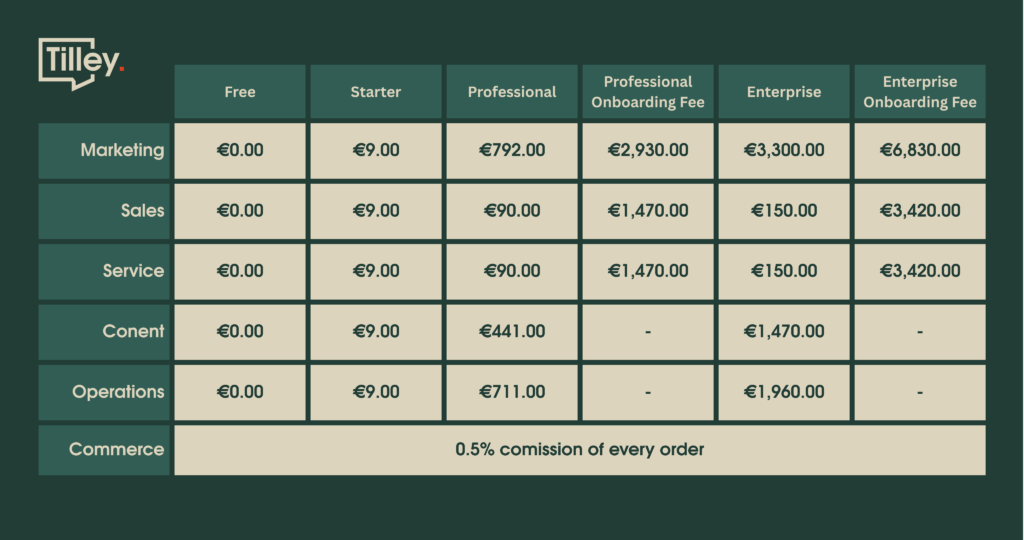
Prices may change, but I believe the architecture of the pricing will be at least similar. Which brings me to the cost of ownership.
Costs of Ownership
When looking at buying HubSpot, you must factor in consultation and support costs from people who understand HubSpot. The total cost of ownership will be average – not high, not low, but it depends on your specific business.
So when you consider buying HubSpot, start by understanding which plan fits your needs and then add approximately the same amount you’re paying monthly, multiply it by two or three (depending on where you live) and you’ll get an approximate estimation of professional services costs you’ll be paying for. Which brings me to the final part of this review: my personal take on HubSpot.
Would I Want to Use This System
When I started this review, I honestly expected to find exactly what I discovered. I knew going in that HubSpot is fundamentally a marketing platform, but they market themselves so aggressively as a CRM system – telling you it’s free, that you should jump right in, that your entire business can live in one place.
And here’s the thing – that’s actually true, but only partially. It’s true if your business happens to fit perfectly into the very specific problems HubSpot was designed to solve. But make no mistake: at its core, this is a marketing platform first. Marketing has to be your priority.
If you’re actively running marketing campaigns, if you have high lead volume that needs nurturing and automation, HubSpot is fantastic. But if you’re looking for a traditional CRM – like if I needed to implement a system to manage 100 existing customers who buy from me regularly, track their information, manage their orders, handle support issues, run custom business processes – this isn’t the right tool. HubSpot isn’t that kind of platform.
What HubSpot actually is: a sophisticated marketing automation tool that happens to have some CRM functionality bolted on. It’s well-built with a clean interface that stays out of your way. The customization options are limited, though the interface design suggests they might expand this in the future. Everything looks modular and platform-like – you can see the building blocks that seem like they should be rearrangeable and customizable. But that functionality just isn’t there yet.
Here’s my bottom line: I’d probably use HubSpot if I had three things – an unlimited budget, high lead volume, and substantial marketing spend. What’s “substantial”? I’ll let you decide that based on your own situation.
It’s genuinely a good product, but it’s a product built around marketing that calls itself a CRM, not the other way around. They’ve redefined what CRM means to fit their marketing-first philosophy.
So the choice is yours. Drop a comment below and let me know – are you using HubSpot? Do you think of it as a real CRM system?
And if you’re exploring CRM options or need help finding the right fit, reach out to us at Muncly. We’ll be happy to guide you through the process and help you choose the solution that actually works for your business!