
When I was 19 years old, working alongside my parents, I first encountered the challenge that many businesses face: I needed a CRM system. As I began researching options, I stumbled upon a small company based in Estonia that had created what seemed like an incredibly simple, almost primitive tool. At first glance, it appeared so basic that I couldn’t quite understand its purpose or value.
That company was Pipedrive, and today it serves over 100,000 clients worldwide, has built a substantial following, and creates what I would call truly unique software. What makes it unique is just how opinionated it is.
On one hand, Pipedrive is a CRM system built with a very specific philosophy – created by salespeople, for salespeople. It’s a system constructed around the founders’ beliefs about how sales should work. They’ve even written a book explaining their approach to selling, defining what the sales process should look like and how deals should move through the pipeline. The entire system is built around this philosophy.
This is simultaneously Pipedrive’s greatest strength and its Achilles heel. It’s both what makes this system exceptional and what creates certain limitations. If this system aligns with your process and your product, it might very well be the only CRM you’ll ever need in your business life. However, if it doesn’t fit your approach – and you might not realize this immediately – it can become quite a disappointing experience.
In this article, I’ll take you deep into Pipedrive to help you understand exactly what it offers and whether it’s right for your business. After reading this review, you’ll understand what Pipedrive is and who it’s designed for. I’ll walk you through the user experience and what I call user adoption – how easy it is to get your team up and running. We’ll discuss product support, including documentation, community, and consultants. I’ll provide a technical review examining the product from a technical perspective, including data models and scalability considerations. We’ll definitely cover pricing and total cost of ownership. Finally, I’ll share my personal thoughts on this product – whether I would want to use it myself and what specifically caught my attention.
Ready to dive in? Let’s begin with understanding the company and how they position their product in the market.
Company and Product Positioning
About Pipedrive
Pipedrive is a sales-focused CRM platform founded in 2010 in Tallinn, Estonia. It was built by a group of Estonian entrepreneurs and ex-salespeople, and the company was born out of frustration with clunky CRMs that didn’t reflect how they think sales teams actually work. Their solution was a visual, user-friendly pipeline tool designed to help salespeople stay organized, follow up consistently, and close more deals without getting buried in admin work. Over the years, Pipedrive has expanded globally while maintaining its Eastern European roots and practical approach to sales.
Today, Pipedrive serves over 100,000 companies worldwide, and while the product has evolved with features like workflow automation, email sync, and reporting, it still retains the same core idea: make selling simple, visual, and effective.
This brings us to a great question: Who is Pipedrive designed for?
Who is the Product For
Pipedrive is designed specifically for small companies with teams of 1 to 50 people. This is a sales-focused CRM built for B2B transactions or high-value sales that require active human involvement: phone calls, emails, meetings, and direct customer interaction.
What Pipedrive does exceptionally well is active sales management. Where it lacks features is customer support or account management. If you’re a trading company wanting to track customer behaviors, monitor order patterns, or manage ongoing client relationships passively, this isn’t your system. Pipedrive is purely focused on moving prospects through an active sales pipeline.
The system excels for digital agencies, SaaS companies, and any business where client acquisition requires hands-on sales activity. They are actively implementing recurring products, which is a way of tracking subscriptions, giving us a clue of who their core customers are.
I can also see Pipedrive working as a complementary tool alongside larger systems like Salesforce, where Pipedrive handles the active sales process while the primary system manages broader customer operations.
Pipedrive serves small, active sales teams following structured, human-driven sales processes. If that describes your business, this could be incredibly powerful. If your sales process is more passive or complex, look elsewhere.
This brings us to cover probably the most important aspect of any software: its user interface.
Experience and Adoption
User Interface
When you first enter Pipedrive as a new user, you’re not immediately thrown into a Kanban board or feature set. Instead, you’re greeted with an excellent onboarding checklist that walks you through exactly what needs to be done to implement the CRM system properly. Having gone through this entire process, I can confidently say this is one of the best-designed customer onboarding experiences I’ve encountered. It’s not just a checkbox exercise – it’s genuinely built by people who sat down and thought through what users actually need to successfully set up their CRM.
The core interface is built around a Kanban board system – cards representing deals organized by status columns. This is a familiar, intuitive concept that requires no special training. What impressed me most was Pipedrive’s exceptional in-app guidance. They’ve strategically placed contextual help throughout the application, explaining specific functions and features exactly where you need them. Each tooltip includes links to detailed documentation, and this educational system covers virtually every part of the CRM.
Another massively valuable feature, which is great for experienced users like myself, is that Pipedrive includes keyboard shortcuts. You can navigate between tabs, create deals and tasks, and access different sections using simple key combinations. For example, keys 1-8 jump to corresponding navigation tabs, key 9 opens additional menu sections, and the forward slash activates global search. This shortcut system is phenomenally convenient for inside sales teams who spend their entire day working in the CRM.
I particularly appreciated the celebratory animations when you close a won deal. This might seem trivial, but in our increasingly digital work environment, these dopamine rewards for achievements are psychologically important and help maintain motivation.
This brings me to an important question: How hard or easy is it to implement Pipedrive?
Ease of Implementation
The onboarding experience sets you up for about 80% implementation completion – assuming your business aligns with Pipedrive’s philosophy. The data import process particularly impressed me. They provide detailed Excel templates where each field is thoroughly documented. I tested this by having ChatGPT generate 200 sample records using their template, and the system imported everything perfectly without any modifications.
What makes this exceptional is the intelligent data mapping feature. During import, you can match your existing data with Pipedrive fields and create custom fields on the fly. If your Excel file contains data that doesn’t exist in Pipedrive, you can map or replace values in real-time. This dramatically simplifies initial system setup, though it does encourage creating potentially excessive custom fields.
One limitation I discovered: you can’t import products attached to deals. For businesses that need to import complex deal structures with multiple product lines, this requires manual entry or custom API work.
This is a good segue to cover the mobile app.
Mobile Experience
Pipedrive’s mobile app represents genuine mobile-first design rather than a desktop interface awkwardly adapted for smaller screens. This distinction becomes immediately apparent when you start using the application – every interaction feels purposefully designed for mobile workflows.
The call recognition feature exemplifies this thoughtful approach. When the app runs in the background and you make phone calls, it automatically detects these calls and prompts you to log them when you return to the application. While testing on an iPhone, I found it doesn’t automatically identify who you called – this functionality might work better on Android devices, though I haven’t tested that platform. Regardless, the simple prompt to log calls removes friction from activity tracking.
The Focus Tab deserves particular attention as it perfectly embodies Pipedrive’s sales philosophy. This prominently displays all your scheduled activities in an easily scannable format, reinforcing their core belief that successful sales requires consistent, planned actions. This isn’t passive account management where you wait for customers to contact you – it’s active sales management where every deal must have a next step and no prospect should go uncontacted.
The green action button positioned at the bottom of the screen provides streamlined access to core functions: adding activities, deals, leads, notes, photos, voice messages, and file attachments. The voice message feature includes an intelligent one-minute limit – a design decision I wholeheartedly support. Frankly, I can’t think of many business scenarios where voice messages longer than one minute are actually listened to or provide value. It would be nice, though, if they had added transcription of voice memos; currently, they are not there.
Email integration works reliably but with some limitations. The app supports standard email clients like Apple Mail and Outlook seamlessly. However, I encountered issues with third-party email clients like Spark. When attempting to send emails through Spark, the system generated errors claiming no email client was installed, when the actual issue was compatibility with non-standard email applications. This isn’t necessarily a fault, but it’s worth noting if your team uses alternative email clients.
The overall mobile philosophy reflects Pipedrive’s opinionated design approach. The interface is exceptionally well-crafted – almost frustratingly so because there’s remarkably little to criticize from a usability standpoint. Everything feels intuitive, responsive, and purposeful.
However, this excellence comes with rigid limitations. You can’t customize the mobile interface, add custom integrations, or modify workflows to match unique business processes. The mobile experience is exactly what Pipedrive designed – no more, no less. For businesses that fit their model perfectly, this creates an incredibly smooth experience, unless you need customizability.
Now, it is a great time to cover Reports and Analytics.
Reporting and Analytics
Pipedrive’s AI report assistant represents exactly how artificial intelligence should function in business software. You describe your reporting needs in natural language, the system asks clarifying questions when necessary, and then generates comprehensive reports with appropriate filters and data visualizations. Having tested this a bit, it performs remarkably well and will likely improve as you feed it more data over time.
The reporting system itself is straightforward, logical, and user-friendly. Unlike some CRM systems that require complex integrations for data export, Pipedrive allows direct Excel exports with customizable field selection.
However, there’s a significant limitation in the lower pricing tiers: custom field reporting is only available starting with the Professional plan. This means if you’re on Essential or Advanced plans and rely heavily on custom data collection, you cannot generate reports on that information. For businesses that depend on detailed reporting across custom fields, this restriction could be problematic.
The dashboard system allows you to combine multiple reports into comprehensive views. Goal setting is available but relatively basic – you can set targets for deals, activities, or forecasts. While simple, these goal-setting capabilities are perfectly adequate if your sales process aligns with Pipedrive’s methodology. However, if you need complex gamification or sophisticated performance tracking beyond their standard metrics, you’ll need to develop custom solutions.
The forecasting functionality provides sales predictions based on your pipeline data, though like the goal system, it follows Pipedrive’s opinionated approach to sales management. For teams that fit their model, these forecasting tools provide valuable insights. For businesses with more complex or non-standard sales cycles, the forecasting may feel restrictive.
Overall, Pipedrive’s reporting strikes an excellent balance between capability and simplicity, assuming your reporting needs align with their sales philosophy. The AI integration is genuinely helpful rather than gimmicky, and the export capabilities ensure you’re never locked into their reporting format.
This naturally brings me to the Product Support section of this review. Let’s start with User Documentation, or in other words, resources available for end-users, not technical people – those who’d use the system on a daily basis.
Product Support
User Documentation
And there is a thing to say: Pipedrive stands out in user education through their learning platform called Pipedrive Learn. This resource center features well-produced short videos that are professionally shot and edited, covering both system functionality and sales methodology. Beyond technical training, they provide education on sales concepts, pipeline stage development, and best practices.
The educational content reflects Pipedrive’s philosophy-driven approach – they don’t just teach you how to use their software, but how to think about sales processes. While the course library isn’t extensive, it’s highly focused and quality-driven rather than quantity-focused. The content includes sales best practices, leadership training materials, and email marketing fundamentals. Everything is practical and directly applicable.
I particularly appreciate that they’ve done significant work explaining sales concepts that I often have to teach my own clients. Please accept my apologies, Pipedrive, but I’m taking some of your ideas and incorporating them into my content. Really – great job done here!
Technical Documentation
The technical documentation is comprehensive, detailed, and well-structured. It thoroughly explains the platform architecture, functionality, and limitations. For developers and technical users, Pipedrive provides clear API documentation with proper examples and use cases.
One standout feature is their approach to API rate limiting. Instead of implementing complex rate limits, they use an API token system that tracks your usage, which is more intuitive for developers to understand and manage. The technical documentation clearly explains these systems and provides practical guidance for implementation.
Community
The community situation is honestly quite ambiguous, and I’m not even sure what to say about it. On one hand, there is a community – in fact, there’s even an official community forum. On the other hand, starting July 1st, 2025, Pipedrive is shutting down their official community forum.
However, the entire community is migrating to Reddit, where they’ve recently created a dedicated subreddit for this transition.
So, there’s this strange situation where a community exists, but it’s in flux. I really hope they don’t completely shut down the forum and that it remains searchable, because there’s valuable historical content there. The forum’s built-in search function is terrible. I tried finding information and it barely works but you can always use Google site search tricks to find relevant discussions and answers on the forum.
There is an active community of people working with Pipedrive, answering common questions, and discussing problems. I also noticed on the forum that Pipedrive hasn’t escaped the common problem affecting all commercial venture-backed companies: long-standing user requests for simple, basic functionality get ignored while they implement AI tools that half the users don’t need but generate hype and attract investor attention.
This is an inevitable path for any large company with significant investor involvement and a board of directors. Unfortunately, this tension is unavoidable.
Nevertheless, the community exists, it’s active, and the fact that people complain and argue with Pipedrive representatives shows there’s no censorship, which is actually excellent.
Now, let’s talk about customer support.
Support
Pipedrive provides above-average customer support, significantly better than industry standards. Response times are reasonable, and they demonstrate genuine problem-solving engagement rather than just ticket resolution. Based on my interactions with their technical support and general internet feedback, their support quality is consistently good.
However, support quality and availability varies significantly by pricing tier. This is clearly outlined on their pricing page – lower-tier plans receive limited support channels and longer response times. Higher-tier plans gain access to additional communication channels, including phone support, which can dramatically speed up issue resolution.
The tiered support approach is transparent but creates real limitations for smaller businesses on entry-level plans. If you’re on a basic plan, expect longer response times and fewer support options. For businesses on Professional or Enterprise plans, the support experience includes direct phone access and faster resolution times.
This brings me to the technical part of my review. Let’s start with Out-of-the-box integrations.
Technical Review
Out of the Box Integrations
Pipedrive offers a substantial number of integrations – over 400 in total. While many of the available connections work well for standard use cases, some critical integrations have notable limitations that frustrate advanced users.
One frequently cited issue involves the QuickBooks integration. While it might seem like a native or tightly connected product (because it’s written “by Pipedrive” on it), it’s important to clarify that QuickBooks is owned by Intuit, not Pipedrive. Despite this, Pipedrive does offer a native integration with QuickBooks for handling invoicing, quoting, and billing workflows. Unfortunately, this integration receives consistently mixed reviews, averaging around three stars on the Pipedrive Marketplace. Users often complain about reliability issues and limited functionality – particularly around syncing invoice statuses or supporting more complex accounting scenarios.
This is especially problematic because the integration supports product synchronization. When products are added to deals in Pipedrive, they can transfer directly to invoices, enabling streamlined analytics and accounting. For businesses managing multiple product categories with different accounting rules, this automation could dramatically reduce admin time. That’s why the lack of polish in such a strategic integration is both surprising and disappointing.
The Zapier integration also receives regular criticism. While I’m not personally a Zapier enthusiast, many users rely on it to connect Pipedrive with other platforms. Unfortunately, Pipedrive’s Zapier modules don’t fully expose the platform’s API capabilities, limiting what can be done without manual workarounds.
By contrast, the Make.com integration performs better. As an active Make.com user, I find the available Pipedrive modules well-structured and diverse. However, like Zapier, they still don’t expose the full API surface area. For advanced users trying to build complex automations, this can be frustrating – but for the majority of use cases, it’s more than sufficient.
That said, for most small and mid-sized businesses, Pipedrive’s integration ecosystem gets the job done. If you need niche or highly specialized workflows, direct API calls (via Postman or custom HTTP modules in Make.com) remain a viable option. While not perfect, the overall system still aligns well with Pipedrive’s no-code ethos and remains functional for the majority of users.
Now, let’s cover the scalability of Pipedrive.
Data Model and Scalability
To understand Pipedrive’s scalability limitations, you need to understand their fundamental philosophy.
Please allow a short explanation here. Software broadly falls into two categories: opinionated and unopinionated systems.
Opinionated software is built around specific methodologies and workflows. The developers essentially say, “We believe this is the right way to do things, so we’ve built software to enforce this approach.” These systems typically feature exceptional user interfaces with minimal configuration options, but they excel at their intended purpose.
Unopinionated software provides tools and customization options, letting users build whatever they need. These systems offer flexibility but require significant setup time and often lack the polish of focused solutions.
Pipedrive is definitively opinionated software. They’ve literally written a 49-page book describing how they believe sales should work, and their entire system enforces this methodology. Within their philosophy, they’ve created an exceptional product with outstanding user experience.
However, this becomes their Achilles heel when you need to deviate from their prescribed approach. Pipedrive offers limited core objects: deals, contacts (which actually include people and organizations), activities, products, leads, projects, and supporting micro-objects. Their documentation includes well-designed data model diagrams that clearly show these relationships.
The scalability challenge isn’t technical capacity – it’s functional limitation. As your business grows and develops more complex processes, you’ll likely need capabilities beyond Pipedrive’s scope. The system won’t grow with you in terms of expanding functionality, though it performs excellently within its defined boundaries.
I’m curious about performance with large datasets, given what I observe about their technology stack, but I haven’t tested this extensively. If you work with high record volumes, I’d be interested to hear about your experience with performance in the comments after this article.
From a business perspective, you should expect to eventually outgrow Pipedrive’s functional scope, but within its intended use case, it will continue performing exceptionally well.
At this point, I should briefly touch on an important aspect of this kind of software – security and compliance.
Security and Compliance
And it is well-handled. As a European company, Pipedrive maintains strong compliance standards from the ground up. Enterprise-tier plans include advanced security configurations, which is excellent for larger organizations with specific security requirements.
The European origin provides inherent GDPR compliance advantages, and their enterprise features demonstrate serious attention to business security needs. For most businesses, their security and compliance posture will be more than adequate.
Finally, let’s talk about product quality.
Overall Product Quality
From a pure quality standpoint, I would rate this product 10 out of 10. I encountered no bugs, no significant performance issues, and no major usability problems during extensive testing. Occasionally there might be minor interface lag, but nothing noteworthy.
The interface design is exceptionally thoughtful, the documentation is comprehensive, and the onboarding experience is outstanding. Within their defined philosophy and scope, this software is remarkably well-executed. I would even call the quality exceptional rather than merely good.
The team clearly invested significant effort in creating a polished, professional product. In the context of their intended use case and target market, the execution is virtually flawless. This level of attention to detail and user experience is rare in business software and deserves recognition.
The only “quality” issues stem from philosophical misalignment rather than execution problems. If Pipedrive fits your business model, you’re looking at an exceptionally well-crafted tool.
Now at this point you may be asking, “What about Pricing?”
Pricing and Value
Plans
Pipedrive offers five main pricing tiers plus several add-ons including Leadbooster, WebVisitors, Campaigns, SmartDocs, and Projects. Projects are included in the price for the top two tiers, while other add-ons require separate purchases.
I won’t publish specific prices since they vary by region and change with inflation, but I’ll discuss the structural approach to their pricing model.
The Essential plan serves as the entry-level tier, but it has a critical limitation: no email integration. In my opinion, a CRM without email integration isn’t really a CRM system. You’re limited to 1,000 records, which isn’t substantial for active sales operations. If you need basic lead tracking, Excel might actually be more practical than this tier.
The Advanced plan represents the first truly usable option, introducing two-way email integration, email templates, mail merge functionality, and call tracking. This plan supports 3,000 records and includes basic automation capabilities. You can also set up recurring billing for subscription products. However, 3,000 records still isn’t substantial for active sales organizations, especially in B2C markets.
The Professional plan adds multi-email account connections, AI-powered email composition, custom dashboards, sales forecasting, and custom permissions. Most importantly, this is where custom field reporting becomes available. The Professional tier also increases record limits significantly.
The AI email feature integrates with OpenAI to help compose messages using ChatGPT. While convenient, I personally prefer creating custom templates directly in ChatGPT and copying content as needed. The built-in integration feels less flexible than working directly with the AI tool.
I personally prefer creating my own custom email templates in ChatGPT and then copying the content as needed. This approach gives me much more control over the output and allows me to refine prompts until they consistently produce the style and tone I want. When I work directly in ChatGPT’s web interface, I can iterate on the prompt, provide specific examples, and create templates that truly match my communication style.
Power and Enterprise tiers primarily offer increased record limits, phone support, and enhanced security features. Enterprise includes sandbox environments for developers and unlimited record storage, plus Projects functionality is bundled into the price.
The pricing structure reveals an important insight: the genuinely functional starting point is the Advanced plan for basic operations, or Professional if you need comprehensive reporting on custom fields. The Essential plan feels more like a trial tier than a production solution.
Now, let’s discuss the indirect costs of Pipedrive, or in other words, the cost of ownership.
Costs of Ownership
Total cost of ownership is remarkably low, but this assessment depends heavily on your situation and expertise level.
If you’re actively engaged in sales with an established customer pipeline and you understand your CRM needs, Pipedrive represents excellent value. The system requires minimal ongoing maintenance, doesn’t need dedicated administrative staff, and can be managed by a sales manager or basic IT support for tasks like data migration and system updates.
The simple user interface eliminates the need for expensive consultants or extensive training programs. For a business that fits Pipedrive’s methodology, paying $50-$60 per user monthly (approximate pricing) provides substantial value compared to the productivity gains and deal tracking capabilities you receive.
However, if you’re just starting out, experimenting with CRM systems, or uncertain whether you need these capabilities, the cost becomes expensive quickly. For a team of 10-15 people who aren’t fully committed to using the system, you’re essentially paying for unused functionality.
The cost equation also changes if your business doesn’t align with Pipedrive’s philosophy. If you need additional tools to handle processes that Pipedrive doesn’t support, you’re adding complexity and expense that could make alternative solutions more cost-effective.
In ideal circumstances – where you understand your needs, your process fits their methodology, and your team will actively use the system – Pipedrive offers exceptional cost efficiency. The total ownership costs remain low because the system doesn’t require ongoing customization, complex administration, or supplementary tools.
For businesses operating within Pipedrive’s intended use case, the combination of low implementation costs, minimal maintenance requirements, and high user adoption creates outstanding return on investment. The system pays for itself through improved sales organization and deal tracking rather than requiring additional investment in training, customization, or support systems.
This brings me to a very important question: Would I want to use this system myself?
Personal Take
Would I Want to Use This System?
I have a very clear and straightforward answer to this question: Yes, I would absolutely want to use this CRM system, but only if it aligned with my business process.
In my current situation as a consultant running a company that sells Salesforce implementation services, Pipedrive would actually fit exceptionally well. We’re selling digital services with a very clear, activity-based sales process that requires actively moving people through defined steps. There’s a structured methodology to our sales approach, and we need to maintain consistent communication with prospects throughout the engagement process.
What I find compelling about Pipedrive is the workflow optimization they’ve built into every aspect of the system. If activity-based selling fits your sales methodology – where success depends on consistent, planned actions and moving deals through defined stages – this is quite possibly the ideal system. I would genuinely tell you to stop looking elsewhere.
The philosophy alignment is crucial here. If your sales process involves active prospecting, regular follow-ups, scheduled calls, and moving deals through clear pipeline stages, Pipedrive’s opinionated approach becomes a massive advantage rather than a limitation. The system enforces good sales discipline while making those activities as efficient as possible.
However, the moment your business needs start deviating from their core philosophy, the limitations become apparent quickly. If you need digital self-service portals, complex user administration, e-commerce integration with order tracking, custom pricing calculations, approval workflows, or customer support functionality, forget about Pipedrive. It simply won’t work for those use cases.
I often see Pipedrive used successfully as a complementary tool alongside larger platforms like Salesforce or Microsoft Dynamics. In these configurations, the primary platform handles customer support, account management, and complex business processes, while Pipedrive focuses exclusively on the active sales pipeline and prospecting activities.
This complementary approach makes perfect sense because Pipedrive excels at exactly one thing: managing active sales processes with human-driven activities. When businesses try to force it beyond this scope, both the system and the users become frustrated.
What impressed me most about this review process was discovering just how thoughtfully designed Pipedrive is within their chosen scope. The user interface optimizations, the workflow enhancements, the keyboard shortcuts, the mobile experience – everything demonstrates a deep understanding of how salespeople actually work day-to-day. This isn’t software built by developers who think they understand sales; it’s software built by people who have actually lived in sales environments.
The documentation, the onboarding process, the educational content – all of it reflects genuine expertise in sales methodology, not just software development. They’ve created a system that enforces best practices while making those practices as efficient as possible to execute.
My final assessment is that Pipedrive represents exceptional software for a specific use case. It’s remarkably well-designed, thoroughly documented, and built around a clearly articulated philosophy that they openly share. Within the boundaries of what it’s designed to do, it performs brilliantly.
But step slightly outside those boundaries, and you’ll discover those same philosophical strengths become rigid limitations. The system that makes you incredibly efficient at activity-based selling becomes an obstacle when you need different capabilities.
So my recommendation is simple: if Pipedrive’s philosophy matches your sales process, implement it immediately and don’t look back. If you need flexibility beyond their model, acknowledge what they do well but look for solutions that accommodate your broader requirements.
Conclusion
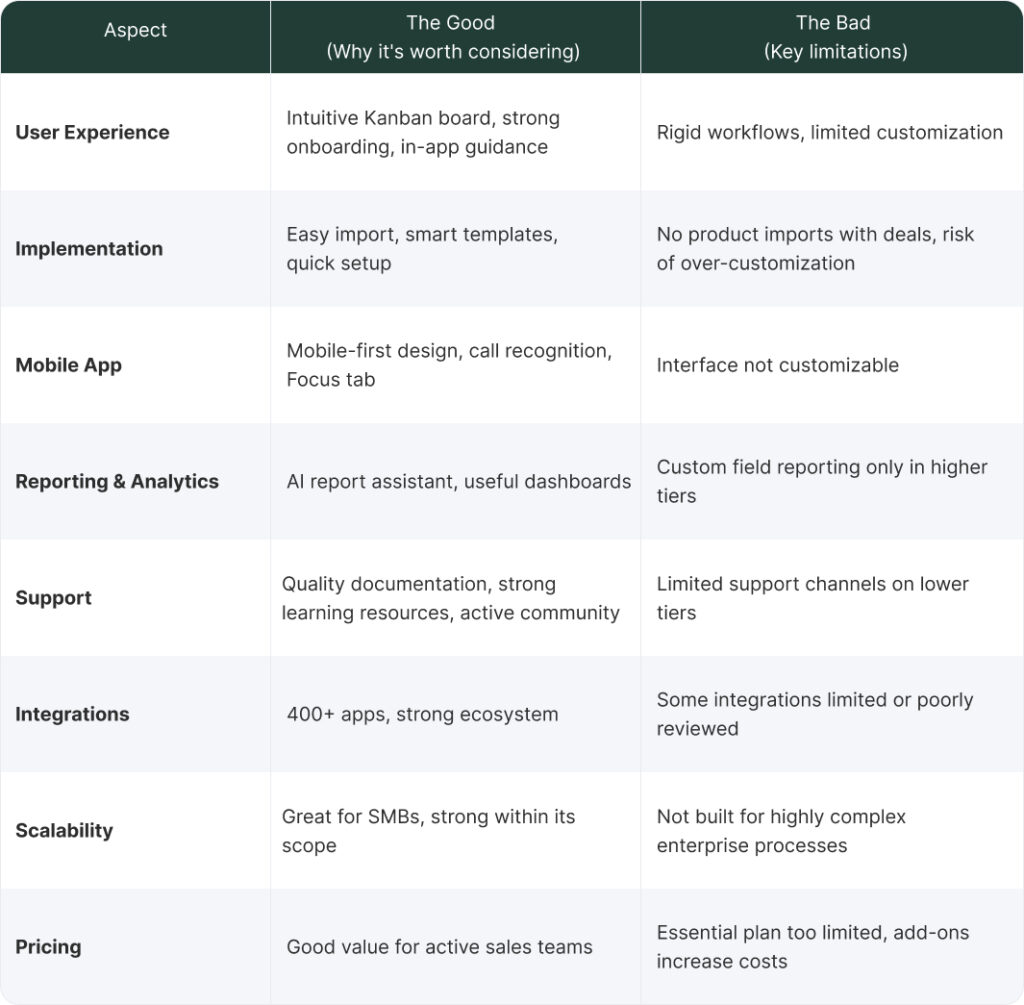
Pipedrive is not a primitive tool; it is a genius, opinionated piece of software purpose-built for active, human-driven sales teams in small to mid-sized businesses (1-50 people). Its power lies in its singular focus on the sales pipeline, resulting in unparalleled user experience, ease of adoption, and genuinely low total cost of ownership for the right organization.
However, its opinionated nature is its inherent limit. It is not designed for complex customer support, passive account management, intricate customization, or for businesses that quickly need functionality beyond its core sales-focused objects. Ultimately, Pipedrive’s success for your business depends entirely on the alignment between your sales philosophy and theirs.
If you’re wondering whether Pipedrive is the right fit for your business, you don’t have to figure it out alone. Reach out to us at Muncly! We can help you evaluate your sales process, compare options, and decide if Pipedrive is the right CRM for you.