
If you are reading this article, there is a good chance you have already realized something very important: your company probably needs a CRM.
Well, maybe you already have one and it feels messy, disconnected, or difficult to use. Or maybe you are only now thinking about implementing a CRM for the first time. Either way, there is one critical aspect of CRM systems in the construction industry that almost nobody explains properly: сonstruction companies do not sell the same way normal businesses do.
To understand why, let’s look at a completely unrelated example. Imagine you own a coffee roasting company. You sell coffee beans to cafes, restaurants, hotels, and office chains. Your customer relationship management revolves around one central thing: the customer account itself. You build long-term relationships with recurring buyers, so your CRM is naturally built around companies and contacts.
Construction, on the other hand, works entirely differently.In construction, even though you still talk to customers, contractors, architects, and procurement teams, the real center of the sales process is usually not the customer. It is the project. A construction site. A building. A job. A tender. A specification package. That one thing changes everything.
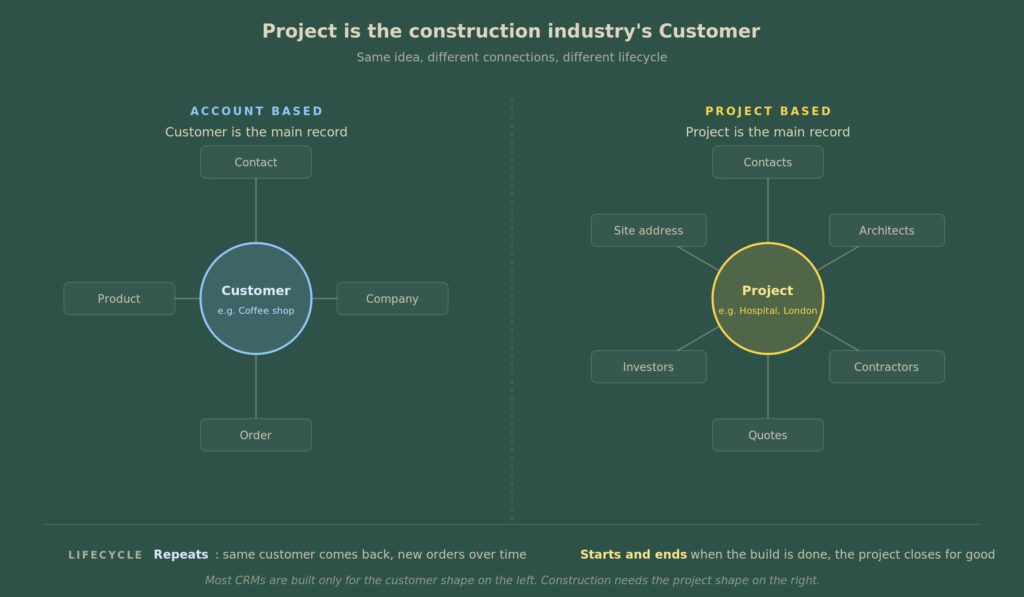
A roofing supplier does not simply sell to “Company X”. They sell into a specific roofing project with its own unique life cycle, deadlines, architects, approvals, and bidding processes. The same applies to curtain wall companies, facade manufacturers, hydro-isolation firms, structural suppliers, HVAC subcontractors, and many others.
This is exactly where many CRM implementations fail in construction. Companies buy standard CRM systems designed around a simple account pipeline, while their actual sales process revolves around projects moving through construction phases.
This article is specifically for construction companies that understand this difference or perhaps are just discovering it now.
You know your sales process is tied to project stages. You know one project can involve multiple contractors. You know opportunities appear months after a specification board starts if you happen to sell specifications. And you know that duplicate quotes, disconnected sales reps, and lack of project visibility can seriously squeeze your margins.
Is this article for you?
This article is specifically for companies that sell project-by-project in construction. This covers a few distinct groups:
- General contractors who run the build.
- Suppliers of construction materials whose products are named in the design.
- Advanced subcontractors, such as curtain wall or glass facade firms, roofing material sellers, hydro-isolation foundations, and structural specialists.
- Any team that follows one project lifecycle in different forms.
- And most importantly, any business that is linked to a project building stage or phase.
When this article is not for you
If you sell on an account basis, this article is not for you. For example:
- A local roofing company that sells to the same property managers consistently.
- A plumbing firm with regular residential customers.
- An electrician on a service contract with a building owner.
If you are in those sectors, your business is closer to a service or manufacturing company than a project-based business. The tools needed there are completely different, and I will cover them in a separate article.
But now, let’s get back to today’s topic and start with the core questions you need to ask yourself when choosing a CRM system for a construction company.
Two core questions for choosing a construction CRM
Before choosing a CRM system, there are two key questions you need to ask yourself. The answers will shape the type of CRM that will work best for your construction business.
Question 1: How big is your company?
Your company size really decides the path you’re going to take. There are three paths here, depending on your team size:
2 or fewer people
If you have 2 or fewer salespeople or customer service people – for example, one person doing quotes and one person doing phone calls – that’s just not enough to justify a CRM system. Good old Excel or Google Sheets, combined with a Google Form for your inquiry submissions, will do the job just fine. You don’t have the massive overhead of multiple salespeople doing the same job, so you don’t need to standardize a complex process yet.
2 to 25 people
If you have between 2 and approximately 25 people in your sales and customer service teams, this is the sweet spot for a CRM system. The solutions we will discuss below will give you a very good answer for the path you should take.
More than 25 people
If your team is bigger than 25 – and again, this is a relative measure, not a rule written in stone; it could be 11, 27, or 37 people doing the same job – you will need to look at something more sophisticated than a standalone CRM system. You will need something like ERP software that can support your complex quoting and pricing mechanisms. While we aren’t covering full ERP setups here, understanding the foundational CRM steps outlined below remains essential.
Question 2: Are you trading or specifying?
What does that mean? Trading means that every deal – or “opportunity,” as it’s professionally called – ends up with money attached to it.
You might ask how on earth a deal could end up with no money. The answer is very simple for companies involved in so-called specification business. Many construction companies – especially manufacturers and those who own their own product – work with architects, designers, and engineers to specify their product. Their sales process almost never ends with a direct sale. After an architect specifies a product and an engineer incorporates it into the project, the project typically goes to tender to find the right subcontractor. That subcontractor later comes to you asking for a quote.
The trading model
If you are in a trading business, you are in a very good position to use pretty much any CRM system out there that is capable of managing pipelines. Suppose you are a roofing contractor. You know the roof size, so you know the approximate amount of money that roof is going to cost your customer. This means you have a clear value for your deal. You also know the approximate close date based on when the customer needs the roof to be done.
With these two numbers in mind, you can start using almost any CRM system on the market that supports pipeline management. The reason I’m saying this is because many pipeline management systems are built around this exact concept.
Once you have an expected close date and a deal amount, the system already comes with a wide range of built-in reports and forecasting tools that can support your process. You don’t have to build everything from scratch.
So if you are a subcontractor or operate in a trading business, you are actually in a very strong position to start using a pipeline management system. It’s one of the best places to begin.
The specifying model
If you specify your product, things become a little more complicated because you will be creating what is called a non-trading agreement. Now, let me explain what a non-trading agreement actually means.
Essentially, by the end of that specific pipeline, you are not selling or closing a deal; you are successfully specifying a product. Now, this is less about construction and more about manufacturers, so I’m not going too deep into here, but I need to touch on it.
For example, an architect puts your curtain wall, roofing system, hydro isolation, or structural piece into the project documents. Then nothing happens for a while. Months later – sometimes a year later – contractors quote the build and start sending you requests for a price. Two things make this hard for a standard pipeline CRM:
- No fixed price and no fixed close date early on: The tool, I mean CRM, wants both. You cannot provide either one. What I mean by that is all these standard CRM systems, when they think about a deal or as some call it an opportunity, they all require one field, which is called “Amount”. And you will not give that amount to that CRM system. Well, of course, you can estimate that by the end of the deal when you successfully close it, but you will not conduct a sale by the end of the process.
- The duplicate subcontractor quote problem: Once you have specified a product on the project, you will then, after some time, sometimes even a year later, see this specification coming from multiple subcontractors, and you need a tool that would allow you to send them quotes that do not compete with one another.
In other words, if John Doe #1 and John Doe #2 come asking for a quote for a roof, you need to make sure that you are sending the same quote to both John Doe #1 and John Doe #2.
The reason is simple: they will usually not mention which job site they are talking about. They will avoid telling you which project they are trying to win at almost any cost. And because of that, you need to be very, very precise in your sales process to identify whether this is the specified project or not.
So you have to link them together, even if two different people are selling to the very same project. Now CRM allows to solve this problem, but not out of the box.
Let me give you an example. Imagine we are building a hospital in London.
The National Health Service runs a tender to find an architect. The architect wins. You then spend a year working with that architect to get your product specified in the project, and eventually the architect finishes the documentation and submits it for approvals.
Then, three contractors come back to your team. They reach three different sales reps, and all three are asking for a quote on the same site.
If your sales reps cannot see that they are working on the same project, you will end up giving three different prices for the same scope of work. The lowest price will, of course, win, and your margin will be squeezed.
And this is exactly why specification work, while technically part of the construction industry, is a little more sophisticated and a little different from standard CRM processes. When I say “a little more sophisticated,” I mean that you will need a project space inside your CRM system.
Imagine it as a folder for each project. The folder sits next to opportunities, which is CRM language for potential deals. Multiple opportunities can be connected to the same project. So when three subcontractors ask for three quotes, you go inside that folder, and any sales rep can open it and see what has already been quoted. Contacts, contractors, architects, and even the building permit number all live inside the same folder.
Before you choose software, map your sales process
Now, before we get to the tools, there is one very important thing you need to do before you start choosing your software. You need to understand which stages your team sells through.
Most CRM systems do not understand the construction lifecycle out of the box, so you will need to configure your sales stages around it. This is homework you will inevitably have to do if you want to successfully implement or improve your existing CRM system.
All that means is that you have to describe how your process – or, more specifically, how your sales process – actually works. What stages does your team go through in order to make a sale?
Construction projects usually follow a very similar lifecycle, no matter where in the world you are located: idea → planning → design → tender → build → maintenance → renovation.
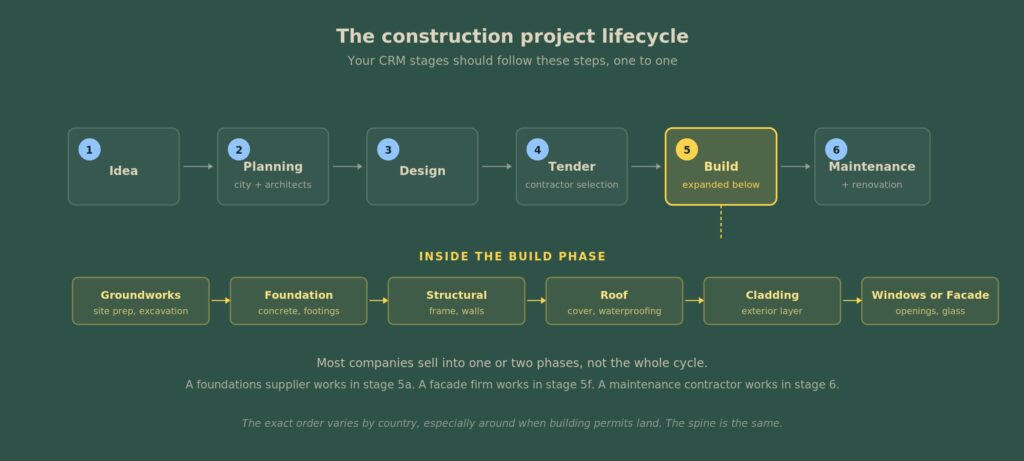
This is the high-level view. In your specific case, you may want to go one level deeper — for example, the build phase might break down into groundworks, foundations, structural works, roofing, fit-out, pipelines, and so on.
Once you’ve mapped your sales process, you are pretty much ready to start looking into CRM systems. And yet again, I’m overly simplifying this for the sake of this article, but at a high level, it really is that simple.
So, I’ll give you 3 solutions – one for each different tier we discussed earlier in this article – and you will be the one to decide which CRM system fits your business best.
What to pick at each tier
To keep things simple, here are three distinct solutions tailored to the team sizes and business models we discussed above.
Small tier: Pipedrive
Let’s start with the small-tier option, designed for smaller teams and usually for companies that operate with so-called trading agreements. The system is called Pipedrive.
Pipedrive is one of the best – if not the best – CRM systems for simple and straightforward sales processes, especially in construction when you are selling projects and operating in a trading-agreement business. In other words, this means you have a deal amount that becomes clearer throughout the quoting process.
Honestly, this is probably the simplest, quickest, and cheapest system to implement because it pretty much has every single tool you need out of the box. It has so-called pipeline management.
Remember, I just explained how your construction process works. The stages of your construction projects become your pipeline, and the pipeline is essentially a number of steps described one after another.
So, you build all those steps into your pipeline. You start adding project names into it. You start attaching contacts to each project card, and that’s it. Then you simply move each card to the next step, and that is really all you need.
And it’s very easy to implement. It has email integration, and it has phone integration, although honestly, in construction, I have almost never seen anybody implement a phone system. But it is super easy to do. Overall, it’s a very easy system to implement, and I really like it.
Now, the trade-off is that it is very limited in terms of customization. If you want to grow, if you have ambitions, and you want something more sophisticated than simply tracking next steps, then the story changes.
Maybe you want more advanced quoting. Maybe you want to implement some kind of specialized tooling, like design software, for example. This is where Pipedrive becomes a no-go.
Technically, you can still do these things with enough time, money, and expertise, but honestly, it’s just not worth it.
It is extremely well suited for smaller construction companies, usually somewhere between two and ten people. Anything beyond that, I personally would not recommend using this system.
Medium tier: Attio
Next comes Attio, and Attio is the new kid on the block. The company was founded in 2019, so it is still very new, but it is an extremely interesting CRM system.
This system can support almost any type of construction sales process. It can support processes where you are selling trading agreements, and it can also support processes where you are selling non-trading agreements.
But the biggest downside of Attio is that it has almost nothing readily available out of the box. You will have to build everything. And by “build,” I mean configure everything inside the system.
It is extremely flexible, but that flexibility is its biggest weakness if you don’t know what you’re doing. You will generally need to hire an expert or a consultant to configure the system properly for your business.
I personally started testing Attio recently to review it, and the more I use it, the more I love it. (Note: I am not affiliated with them, though I have applied to their partner program because the product is genuinely that good).
What you need to know, as an average John Doe working in construction without a degree in IT, is that you can actually chat with the system. If you are already using tools like ChatGPT or Gemini, then the experience will feel familiar.
It has a homepage where you can see almost everything you need for your current day: your tasks, your open opportunities, and a built-in chat interface. You can simply type something like, “Create a new lead for me,” and the system will create it. You can copy and paste information from your emails, and the system can actually read those emails and build context from them.
It is an extremely powerful tool. Yet again, you will have to spend time and money customizing and implementing it into your business. But it is a really strong middle-ground option if your company has somewhere between five and twenty-five or thirty people, and you want to build something that will last for years and truly fit your business.
Attio is especially strong if you operate in a non-trading agreement business, particularly if you are specifying products for construction projects.
Large tier: Salesforce
Now, here comes the final option. And the final option is something I have worked with for more than 10 years and something that has de facto become an industry standard. That is none other than Salesforce.
I have a sort of love-hate relationship with Salesforce because it can do pretty much everything. It can even do things you do not really need. It fits almost every possible and impossible use case you can think of.
But the problem with Salesforce is that it is becoming extremely outdated. And I do not know how much of a problem this is in the construction industry, considering the level of technical expertise people usually have there and the fact that you are most likely not building an IT company around your CRM system.
But the issue is that I am now using Attio, which essentially feels like an immature clone of Salesforce. It feels like early-stage Salesforce done right. That is the feeling I get from Attio.
Salesforce has its own AI agent called Agentforce, which, to be frank, is disappointing. It does not work reliably. It is buggy. It is not delivering the results people expected. We tried implementing it with a couple of customers, and I almost published a very excited article about Agentforce when it first appeared. But I decided to hold off and properly test it before publishing anything.
And honestly, last year we were barely able to launch agents that worked reliably. Now it is a little better, but it is still incomparable to what other systems can do. Anything that can properly connect with ChatGPT is already far more powerful than what Salesforce will probably ever become in this area.
And the reason is simple: Salesforce is an old system. It was built in the late 1990s. And no matter how good it looks today, even with all the recent design updates, underneath it all, it is still a facelift built on top of very old technology.
Though, if you are a conventional company, if you want to stay on the safe side, and if you simply want a straightforward, classical customer relationship management system without too many additional bells and whistles, then Salesforce is still a very safe bet.
If you woke me up at 5 a.m. and asked me, “Hey Jeff, what system should I choose to guarantee that it will work if implemented correctly and with the right partner?” I would still probably say Salesforce.
And the reason is simple: Salesforce has the largest ecosystem of consultants. It has one of the biggest sets of out-of-the-box features. It has a massive number of apps, including many built specifically for the construction industry. And it integrates with almost every major tool available on the market.
So if you ask me, Salesforce is still the safe path. But I am saying this without much love, to be honest. Even though Salesforce gave me a career and I built my company around it, I genuinely think it is losing the technology race.
It has been a great journey with Salesforce, and I can still recommend it, but honestly, the further we go into this AI era, the more I start thinking that one day I may stop recommending it entirely.
AI is simply becoming too useful. We are seeing technology become more and more mature. And by “mature,” I mean that normal people can start using it naturally.
You can now talk to your CRM system. You do not have to open your laptop. You do not have to manually fill out forms. You simply talk to it. That is the reality I already have right now with Attio. I connected the system with Claude. Claude is essentially an advanced AI assistant that has access to different tools through a protocol called MCP. You do not really need to understand the technical side of that. Just take my word for it.
But it is a completely different experience when you can talk directly to your CRM system, especially when you are constantly on phone calls or driving between job sites. You can simply say, “Hey, remind me to call this customer.” Done. The system handles it for you.
Summary
So, these are the three CRM options that can fit your construction business. Each one serves a different stage of growth and a different level of operational complexity. The right choice ultimately depends on where your company is today and where you plan to take it.
Pipedrive is for companies operating with trading agreements, with straightforward pipelines, and without the need for anything too sophisticated.
Attio is for companies that are comfortable putting in a little more effort and hiring consultants to build something more customized.
And Salesforce is for companies with larger budgets that are comfortable hiring consultants and investing heavily into customization.
Yes, you can use ready-made apps from the marketplace, but overall, it is still going to cost significantly more than Attio or almost any other system on the market.
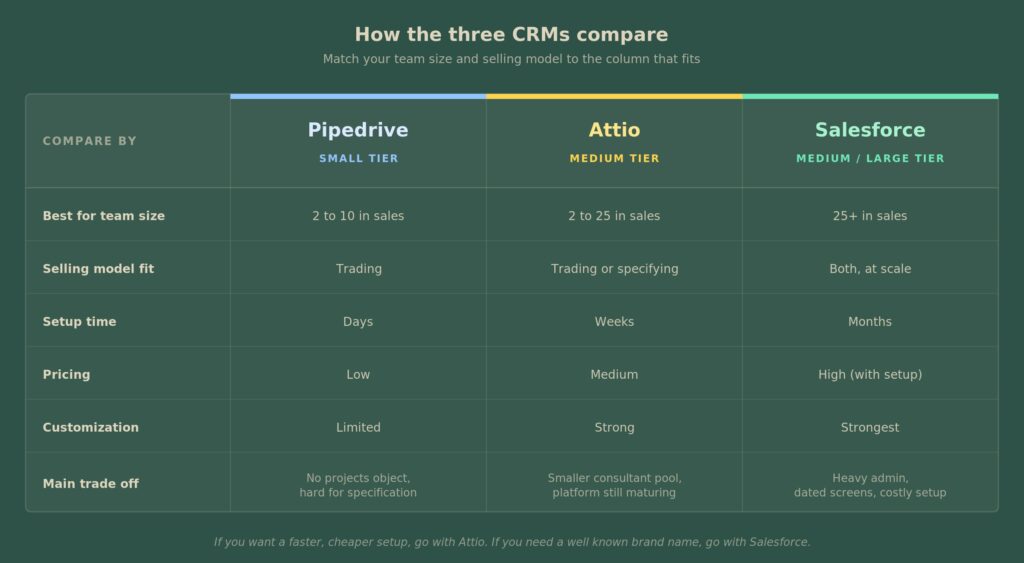
So these are the three systems I would personally choose from. That does not mean other systems do not exist. I just believe these three are currently the strongest options for companies in the construction industry, especially because construction is not really about “closing deals” in the traditional sense. In construction, you are selling projects, not just deals, and that changes the entire CRM process.
One more warning: do not build your own CRM
One last thing I would strongly recommend is this: do not try to build your own CRM system from scratch.
Even with the AI tools we have today, a custom build is a multi year project. It takes time and energy away from selling. You will end up with a half finished tool, a tired team, and the same pipeline problem you started with.
Buy a platform. (I have a separate article on why custom CRM projects fail. You can check it out here.)
What this article does not cover
A few things are out of scope on purpose.
- Step by step Salesforce or Attio setup for construction
- BIM integration patterns
- Field workflows for service style subcontractors (the companies I told you to skip this article for)
- Phone system integration. You do not need it in construction. Most of your work is in email and meetings, with a few calls now and then.
Each of these will be its own piece in this series.
What to do this week
Here is what to do before you talk to a single vendor.
Sit down with your team. Write two short pages on paper.
The first page maps your version of the project lifecycle. List the stages your team works in.
The second page answers the trading vs specification question. If most of your deals close with a fixed price and a fixed date, you are trading. If most of them start with your product being named in a design, you are specifying.
The platform choice gets simple once those two pages exist. Match your size and your answers to the tier above, and the tool picks itself.
If you want a faster path, book a free audit. We spend an hour inside your current setup. Then we send back a plain language report on what is working, what is broken, and what to fix first. This is a good fit if you suspect duplicate quotes or specification work that is not converting. Book it here: https://muncly.com/crm-audit/