
If you’re reading this article, you’ve probably come to the conclusion – or have yet to come to the conclusion – that it’s time to implement a CRM system in your insurance or mortgage business. Maybe you already have a CRM, or you’ve had one in the past and it didn’t work out the way you wanted.
Now, in this article, I’ll explain a couple of things. First, how the insurance and mortgage business is different from any other business from a CRM software perspective. Secondly, what you need to know about your own way of working and what decisions you need to make before you choose a CRM. And finally, I’ll give you three recommendations for what software to choose.
Who is this article for?
But first, who is this article for? This article is for insurance agents, mortgage brokers, financial advisors, and small financial services firms that sell regulated products where trust, follow-ups, renewals, documentation, and long-term client relationships matter. If your work sits somewhere between fully automated online sales and completely bespoke advisory projects, this article will help you decide whether you need a CRM at all. And if you do need one, which type of CRM fits, and when CRM software is the wrong tool entirely.
Who is this article not for?
This article is not for companies selling fully commoditized products entirely through things like self-service websites. It’s also not for highly bespoke advisory firms handling only a handful of large, one-off projects per year. If your business runs entirely on an automated online checkout or entirely relationship-driven project management, this article is probably not for you.
Note: If you find yourself needing hands-on guidance after reading this article, we at Muncly provide CRM consulting. We offer a free CRM audit to help you map out your architecture, alongside a diagnostic CRM quiz to determine whether a CRM is really necessary for your current stage.
The three questions to ask before choosing a CRM
Before evaluating specific CRM systems, you must answer three fundamental questions about your business model:
- What specific type of business do you run?
- What is the actual size of your company?
- Are you primarily selling one-off insurance policies, mortgages, or financial products, or are you building long-term customer relationships and recurring business?
Let’s answer these questions one by one.
Question 1: What type of business do you run?
First: what type of business do you run? Now, let me illustrate this for you. Let’s say Broker A sells car insurance in Rotterdam, the Netherlands. Each morning, she gets 50 inquiries through her website and issues 50 policies the same day. She does not speak to a human buyer. The website does the work. Her margins are razor-thin and her competition is very, very fierce. Twenty other carriers sell exactly the same product. Her main asset and tool is her website.
Now, Broker B sells art insurance. He has been on a project for four months. A private collector wants to insure a Renaissance fresco that has never been to auction before. Broker B is on the phone with a museum conservator, a lab in Florence, and an underwriter who needs three more pieces of paperwork. He will close, at best, five of these projects this year, and he will earn enough – and I would say even earn well.
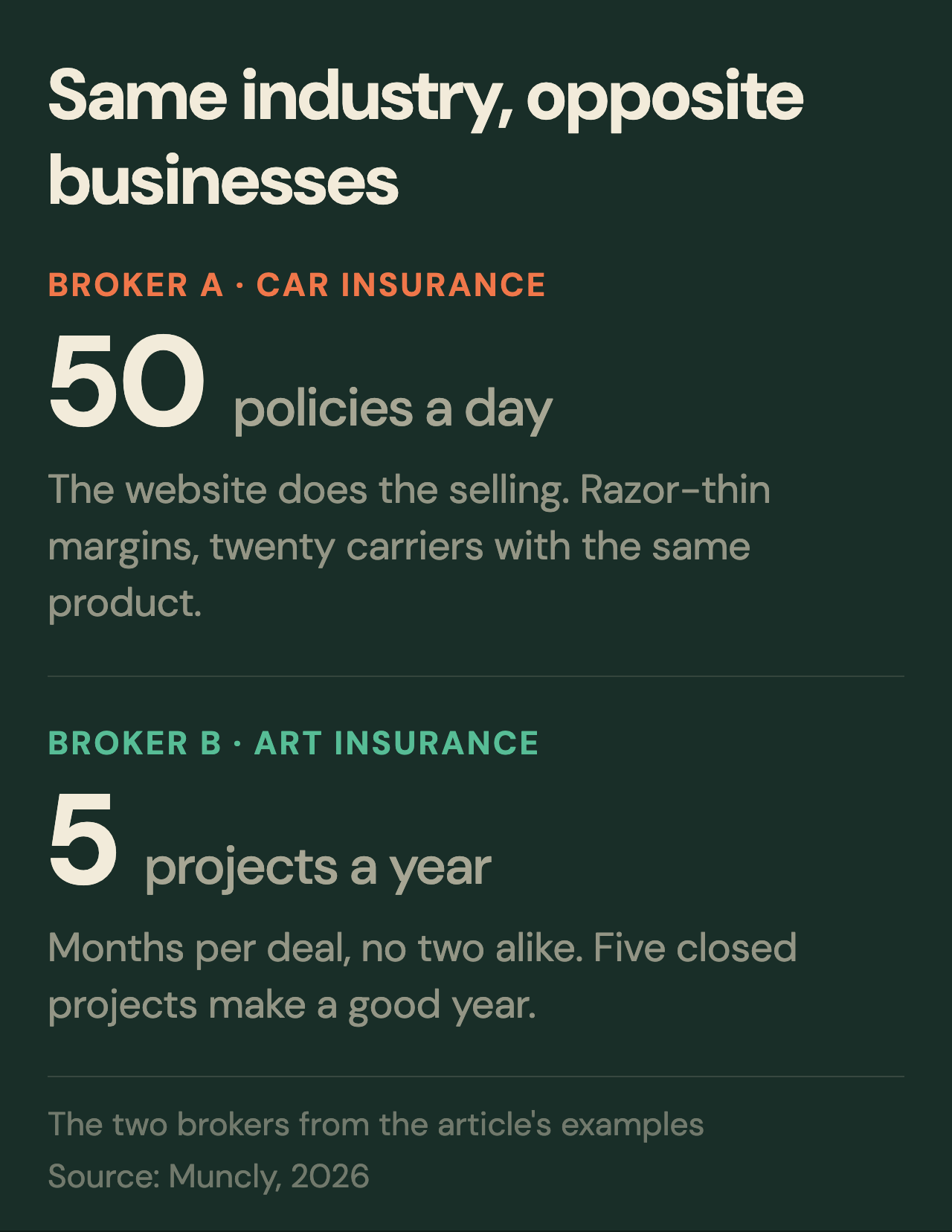
High volume vs. High value operations
Now, these are two extreme examples, but they illustrate the approach you need to take. For Broker A, the key is speed and the ability to process as many customers as possible. That means any CRM that heavily relies on human interaction would not suit this business.
There is a really good comparison in the book called Spin Selling by Neil Rackham, which I definitely recommend reading even if you’re not in the consulting or sales business. He says, imagine a man in a suit walking into your office trying to sell you a paper clip. It wouldn’t make any sense. And that is exactly the case with highly commoditized insurance products that are super accessible and sold to everybody. It wouldn’t make sense to hire an insurance broker in a suit to sell that kind of insurance.
Now, Broker B sits on the complete opposite side of the scale. You simply could not build a website for this. You could not build self-service tools for this kind of business. So when you’re choosing a CRM, you cannot choose a CRM that is designed only for high-volume operations.
Understanding the commodity vs. Bespoke scale
I created a scale that will help you understand where your business sits, and you need to understand your number on that scale. Now, if you are a 1, a conventional CRM is probably not suited for you. If you are a 10 on that scale, a conventional CRM wouldn’t suit you either. The sweet spot is somewhere in between.
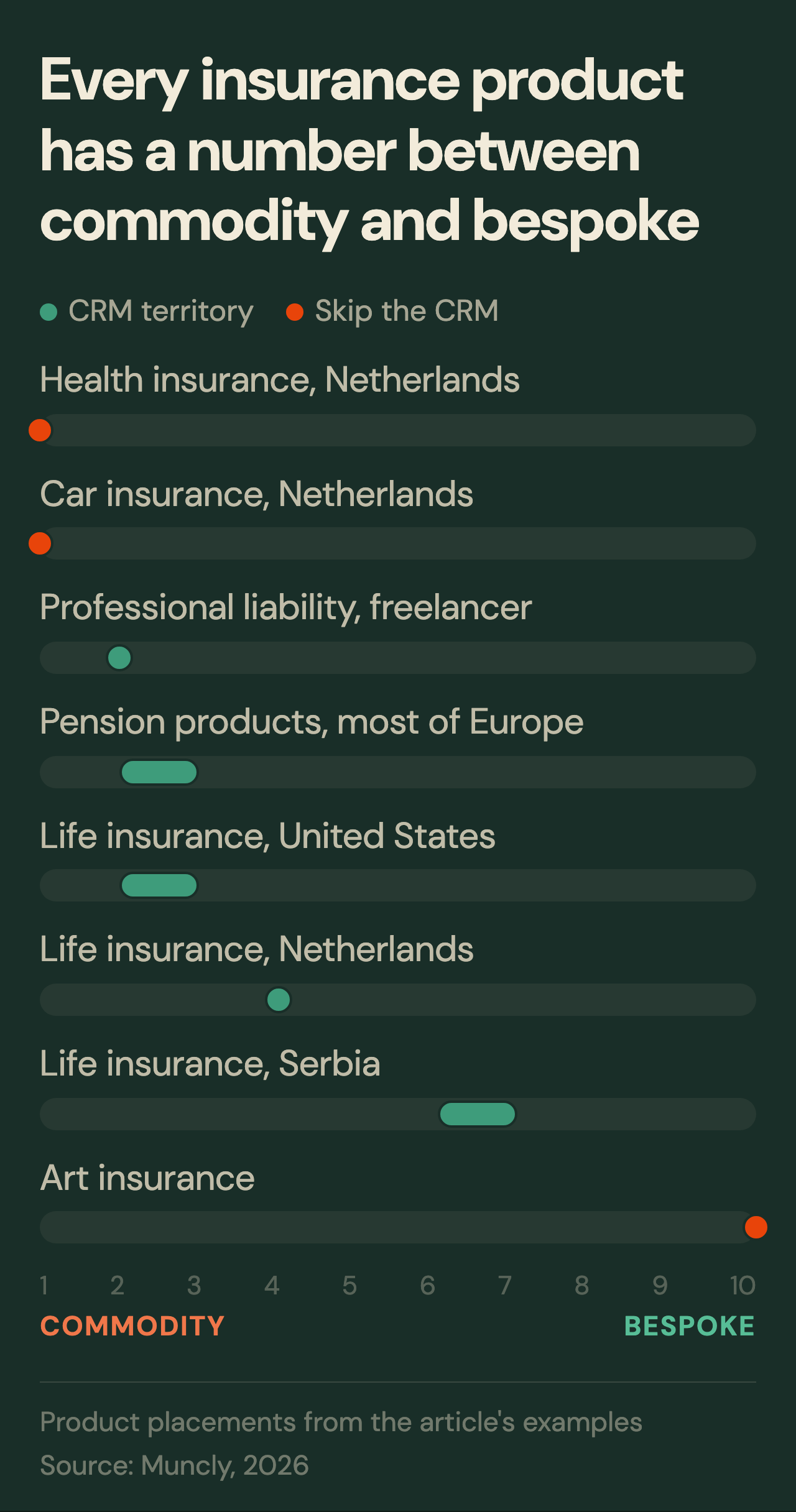
Let me explain the scale in a little bit more detail, because this is a really important concept when choosing a CRM system. I’ll be taking the same two examples: one with the car policy, the other with the art insurance.
A 1 is a pure commodity. The buyer cannot tell you which carrier sold them the policy. Think about how a car has changed in 100 years. In the 1920s, a car was almost a luxury. Today, it’s an appliance. You can literally buy a working used car in Amsterdam for like 2,000 euros if you look hard enough. The prices have collapsed. The product has commoditized, and the insurance that goes with it has commoditized too. Twenty carriers sell the same coverage. The buyer compares them on a single screen. The policy is signed before they have even read the company name.
Now, a 10 is fully bespoke, on the other hand. Insuring a Renaissance fresco is complex. Authentication takes weeks. Valuation maybe takes months. You may have to ship the work to a museum in Florence to confirm it’s real. There is no comparable sale on record. Each project is structurally different. You might close, as I mentioned already, maybe five a year, and that would be enough.
In between, products fall along the scale. Life insurance sits around 4 in the Netherlands. In the United States, where it sells more often, it is closer to say 2 or 3. In Serbia, it is a 6 and sometimes a 7. Let’s say a pension or social products sit around 2, and in most European countries, it could be maybe 2 or 3. They barely exist in some former Soviet states, on the other hand.
Now, another example: professional liability cover for a freelance consultant like myself, which I pay roughly 120 euros a month for, is a 2. Now, health insurance in the Netherlands is a pure 1. You see how these are different. Depending on what product you sell, it may be a 2, 3, 4, 5, 6, 7, or 9. If you are a 1 or a 10, in these two extreme cases, you don’t need a CRM. All the others can benefit from it massively.
The biggest job a brokerage can do for itself is to find its own number on this scale, per product line. Once the number is in front of you, you can make the correct judgment.
Question 2: What is the size of your company?
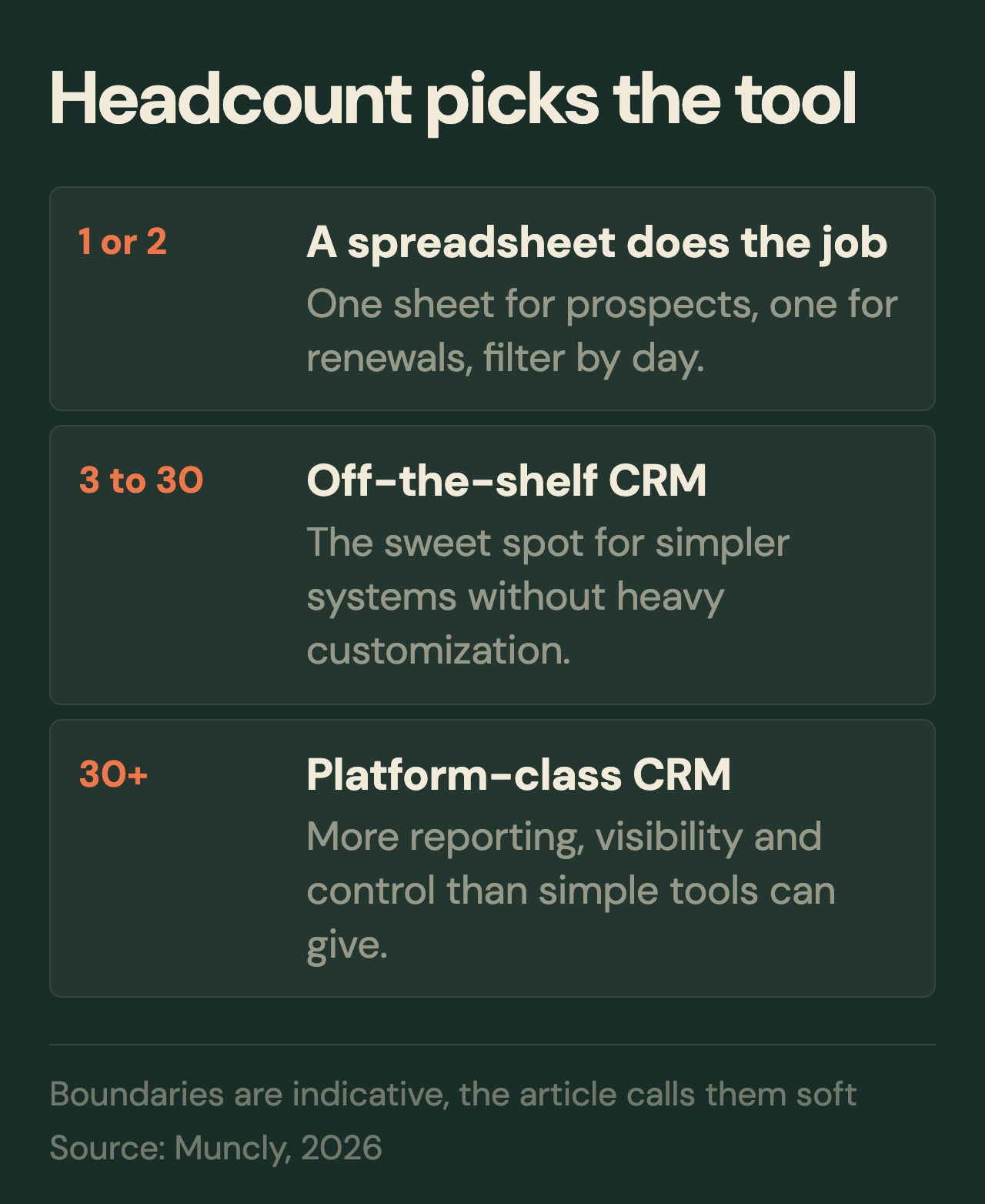
Which brings us to the next question: what is the size of your company? And the answer here is actually pretty simple. If you are two people selling mortgages, insurance, or similar financial products, you probably do not need a CRM at all. Even with a lot of clients, a good old Excel spreadsheet will often do the job perfectly fine. One sheet for prospects and another sheet for recurring transactions or renewals. Every day you simply filter by month and day, and you immediately see who you need to follow up with that day. It’s as simple as that.
Once you move into the 3 to roughly 25 or 30 people, this is usually the sweet spot for simpler CRM systems. And this is not a hard-coded number. It could be like 37 or 45, really depending on your business, how it’s structured, and what kind of product you sell. But generally speaking, companies in this range can often use an off-the-shelf CRM without heavy customization. The keyword is heavy.
Once you move beyond that, you usually start needing more serious platforms because the bigger the company gets, the more management, reporting, visibility, and granular control you need. And simpler CRM systems usually aren’t enough anymore. I will explain this more in the second part of this article where I will give you the three CRM options to choose from – actually, maybe even four – which is a great time to ask the third question.
Question 3: One-off transactions vs. Recurring business
Now, the third question is also very simple: are you primarily selling one-off financial products, or are you building long-term customer relationships and recurring business? And this is a very straightforward distinction. Are you selling something like a mortgage where a customer buys once and then effectively disappears for the next 20 or 30 years? In that case, this is essentially a one-time transaction. Or are you selling something recurring like home insurance, life insurance, or other policies that require renewals, contract extensions, and regular, human follow-ups? Because that will have a big impact on the decision you’ll need to make.
You may need reminders 30 days before a policy expires, for example. You may need renewal pipelines. You may need automated follow-ups and customer retention workflows. And not all CRM systems are designed for that. So ask yourself a very important question: Do you want a relationship business, or do you simply want a tool that helps you process one-off transactions reliably? Let’s put it this way, because those are two completely different types of CRMs, which brings us to the most important part of this article: which CRMs to choose.
Four CRM systems recommendations
Based on the criteria above, here are four distinct software recommendations ranging from lightweight organization tools to heavy enterprise infrastructure.
Recommendation 1: Notion for getting started
Before we jump into real CRMs, I want to mention one brilliant product. That product is called Notion. Notion is essentially a glorified notebook. Notion is a great starting point if you are not sure if you even need a CRM but you want to start learning. If you want to embark on this journey of getting to know software and learning how to use it in your company, Notion is a great place to start. First of all, because in Notion, you can set up so-called Kanban boards.
Why it works: It allows you to build simple Kanban boards and relational tables at a nominal cost. You can quickly map out custom deal stages (e.g., New Contact, Negotiations, Closed Won) and assign team members to specific accounts.
The hidden benefit: Notion serves as a low-risk diagnostic tool. It exposes your team’s internal operational friction – such as data entry discipline issues or missed fields – before you invest thousands of dollars implementing an unyielding enterprise ecosystem.
I’m using Notion all the time. If we are setting up a new partnership or we don’t know where to put a certain type of process, we just do that in Notion first. And if this process flies – if it starts living in the company – we just keep using Notion. So Notion is your first bet.
Recommendation 2: Pipedrive for one-off sales
Now, the second one is Pipedrive. Pipedrive is wonderful for companies that are mature enough and big enough to start using a CRM. What is Pipedrive great for? Remember I mentioned that you have to decide whether you sell one-off or you sell recurring? Pipedrive is great for those who sell one-off.
Now, some Pipedrive specialists might argue, “Hey, but we do have recurring features in Pipedrive.” Yes and no. The thing with Pipedrive is that it’s great for what it was designed for, and it was designed for so-called pipeline-managed sales. I’m not sure what the right word is here, but essentially, it was designed to sell through a pipeline.
Let me try to explain what a pipeline is in a very simple example. Imagine you go on a date and you ask a lady or a boy for intimacy as your very first sentence. What are your chances for success? I know that’s a bit blunt, or rather a bold example, but it pretty much illustrates what a lot of companies are trying to do. They are trying to sell a product that should be sold very slowly and split into different processes straight away.
So that’s why in sales, pipelines have been invented. You split your big sales process into smaller, simple steps where it’s easier for a customer to make a decision on each individual step. Suppose you have a new contact that just landed from your website. This is your “New” stage. It means that somebody has filled in a form on the website and you need to follow up with them.
The next stage—let’s say you have contacted them and you have confirmed this is a real person, they are interested in your product, but they are just not yet ready for your next step. Let’s call this “Contacted.” Now let’s continue this conversation. Let’s say you have contacted the person, the person has agreed to whatever you’re selling, then you move that person to the next stage. On the next stage, let’s say here, we made an offer, and so on and so forth, up until the moment where you either win this customer or you lose this customer. Let’s say you are winning.
Every next step for your customer should be a little bit harder than the previous one. The first step is leaving contact details on the website. Actually, before that, it’s just browsing the internet. So sometimes you create lead magnets, sometimes you play around with reducing this difficulty of making a decision to leave contact details in a contact form. Nonetheless, somebody leaves their contact details in the form, and it lands in your CRM system. Let’s suppose it’s Pipedrive. What you do is move this client, move this contact through the pipeline.
So you first contact the person, you ask questions, and what you do is start qualifying them. So you start asking: What is the type of insurance you’re looking for? When do you want to make a decision? Whatever the variables are for the insurance you want to make. Who are you comparing us with? And so on and so forth. You move them up until the moment of winning or losing this contact. And this is called a pipeline. You have 100 customers here, and you have maybe 10 customers here, so your pipeline conversion rate is 10%. And this is the concept around which Pipedrive is built. This is why I was explaining this concept to you. And this is a great concept. This is super nice when you are in this kind of sales.
But there is a problem. The moment you start introducing a lot of recurring products – let’s say you are selling life insurance, let’s say you sell utilities on top of that (I know a lot of companies do this), let’s say you sell mortgages or some other financial services that are recurring – in Pipedrive, you will have to create a separate pipeline for each of those services. And that might be completely fine with you. But the problem with that is that you will have a very limited overview of the client. You will not be able to see in one place what the next subscription date is or when you need to call them. It’s going to be a little bit tricky because the system was not designed around that. Of course, you can implement that in Pipedrive, but it was not designed for this.
So, I’m not recommending implementing Pipedrive for anybody who is in this recurring transaction business unless you only sell one product. If you sell one product, it should be fine. If you sell more than one product, it’s not very good. And also, Pipedrive is not very strong in heavily customized processes. So if you have some sophisticated KYC (Know Your Customer) workflows, or if you have some legal verifications and you need integrations with third-party systems, Pipedrive is challenging. Pipedrive is really for straightforward, pipeline-type sales processes.
Recommendation 3: Attio – AI-ready platform
The next recommendation on my list is a system called Attio. Now, Attio is a very interesting CRM system, first of all, because it’s relatively new. It was founded in 2019 and sells itself as a simplified alternative to Salesforce. And that is true. Recently, I started using Attio myself. And for full disclosure, I have actually applied to their partner program for the reasons which I’m going to mention in a moment.
So, Attio is a platform that needs to be configured, that needs to be customized to your own insurance business needs. But what is beautiful about Attio is that it’s probably the first – like, truly first – CRM that is AI-ready. Now, don’t get afraid of the word AI. I know the internet is flooded with AI. We have AI this, we have AI that. What that means is that Attio has a three-letter abbreviation thing which you should care about. It’s called MCP.
MCP is Model Context Protocol. It’s a technology that allows you to connect the system to any AI agent. Why should you care about this? Glad you asked. Because it simplifies your life. You couldn’t imagine how nice it is to chat with your CRM rather than going into each individual card and typing all that information in. I would say even more: I have connected Attio myself in my sales process to Claude. But most importantly, you can connect third-party tools through MCP without actually being a developer. This is a very important part here. And it has a built-in integration with Attio. You don’t even have to do anything. You just go there, authorize Attio, and start working with it.
So, imagine you are receiving documents from your customer. You just throw those documents into Claude. Claude can read those documents, do stuff in your CRM system, and process stuff on your computer. And this is a game-changer, at least for me. I don’t know about others, but I am an extremely lazy and unsystematic person. I forget stuff. It’s so easy when you can just chat with your system. Of course, you have to configure it a little bit. You don’t have to spend years configuring it for voice. Yes, you will have a couple of additional subscriptions; namely, you have to subscribe to Claude, and you’re good to go.
And by the way, if you don’t want to subscribe to anything, they do have an inbuilt chat feature – which, by the way, I am not really sure about because they have very low limits. When I say limits, I mean they issue tokens for the usage of their platform. And these conversations in chat consume those tokens. Nonetheless, this is extremely useful. You can still use that feature. If you’re not a heavy user, it should be fine.
There is one thing I need to mention about Attio. You cannot simply subscribe to it, buy the product, and start using it, because that product comes really bare-bones. You cannot install the product with just a couple of modules and be good to go. You will have to configure it. But honestly, you’re pretty much okay with just out-of-the-box features; they just require configuration.
And God forbid you try to customize the system without prior IT knowledge. You have to have a general technical understanding of how systems work. And you had better hire somebody like me. I’m not saying that you have to hire me; you can easily find somebody locally – somebody who knows how systems should be customized and what the right way of doing it is. Because if you do it wrong, you will end up with bad reports, a clunky interface, and processes that do not match your business. This is very, very tricky.
So, Attio is sort of easy to recommend from a user interface perspective and easy to recommend from a usefulness perspective, but it’s not that easy to recommend when it comes to ease of implementation. So if you are okay spending a little bit more time educating yourself on how to use these platforms, go with Attio. No questions asked. It’s a great system. It will serve the purpose really nicely and you will love the user interface, especially the part where you chat with it.
Recommendation 4: Salesforce – industrial standard
Which brings me to my fourth recommendation on this list, and this is no other than Salesforce. Salesforce has been there since 1999. Salesforce is a massive system with a great ecosystem, but it has its own downsides.
First of all, Salesforce is losing the technology arms race. I’m saying this as somebody who has been with Salesforce for far beyond 10 years. I worked with Salesforce as a sales rep in my early career days, and now I have been a consultant for 11 or 12 years – as somebody who has been on the software delivery side. So I’ve been customizing systems for my clients and delivering them so they can start using them.
And Salesforce is amazing. It’s a fantastic system, a phenomenal system, because it can pretty much do whatever you think a CRM system should do. Salesforce probably has already built that in as a feature or as an app on their app store. It’s called the AppExchange. It’s just a different name for an app store. You can really quickly purchase licenses for Salesforce, find the app that works for you in the insurance business on the marketplace, and hire the company that built that app. They quickly configure everything. You can get up and running in like maybe a month, maybe six weeks from start to finish. It’s super easy to do. It will take you some time to learn the interface of Salesforce, but generally speaking, this is true with any other CRM system.
If you buy a good AppExchange extension, you don’t have to design anything yourself. Your risks are essentially close to zero if you find a good AppExchange extension for insurance. Or you can go the other way: you can build Salesforce around your processes yourself. Again, you will have to hire somebody for that, just like with Attio. Except in the Salesforce ecosystem, there are more consultants available. Salesforce, I would say, is a safe bet. So if you don’t want to risk subscribing to software from a new company that you don’t know if it’s going to be around in the next 10 or 15 years, go with Salesforce. It’s a no-brainer. But Salesforce has one massive disadvantage.
Salesforce is a huge corporation, and they don’t care about you. What they care about is selling more licenses. And God forbid you leave your contact details on a Salesforce website and you go with their recommendations and blindly buy whatever Salesforce offers you. Because they will tell you that you need Slack, you need Agentforce, you need Service Cloud, and you need Sales Cloud. They will try selling you to oblivion – just selling you everything they can squeeze. You don’t need all that. You had better hire somebody locally as a consultant, explain your situation, and say, “Hey, we want Salesforce because that’s a safe bet.”
That’s essentially a system that holds more than 70% of the market, depending on which numbers you look at in which countries, but it’s more or less true. It’s the one system that holds the majority of the market, and then there are others. The next competitor is way behind with just a few percentage points of the market share. So Salesforce is pretty much the giant, and it’s the de facto standard for a lot of venture capital firms. If they go to invest somewhere, they just say, “Hey, you have to install Salesforce because we know how to use it, and that’s it.”
So Salesforce is a safe bet. The problem is that it takes a very long time to learn. You will have to have somebody who is a power user. Ideally, you have somebody with an administration certification inside your company, because Salesforce is a very hard system to manage. It’s a very sophisticated system with a lot of features. And the flip side of those features is that you will have to manage all of that on your own.
Or you can hire a company like Muncly, where we do everything for you. We implement it, we configure it, and we support it after we have completed the initial implementation. So you can go in either direction, or you can just buy the plugin from the marketplace, as I just mentioned.
Final summary: choosing the right option for your goals
So, there are 4 recommendations.
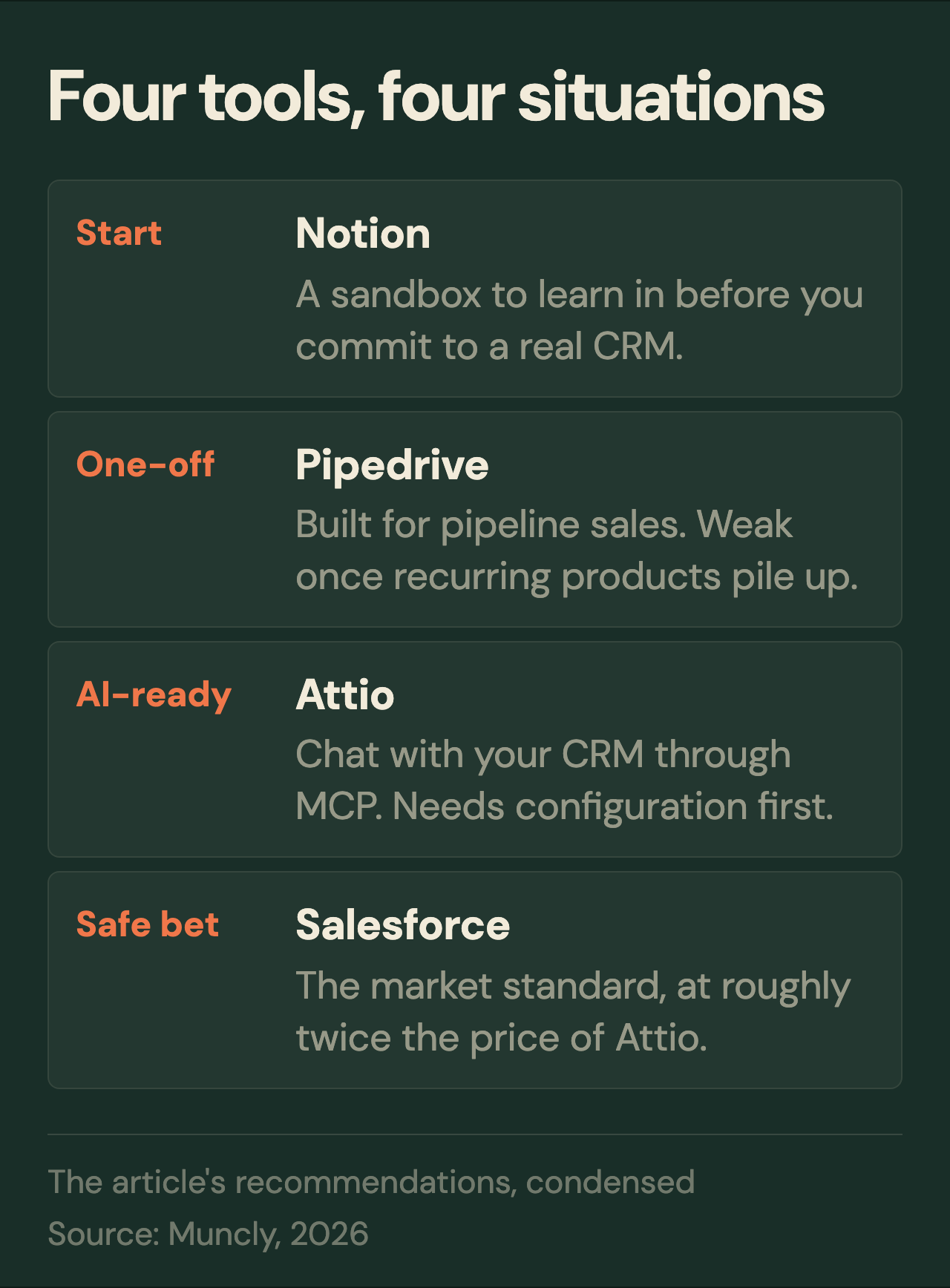
Notion for those who are starting out but are not really sure if they want a CRM or not. That’s a super quick way to play around – let’s say it’s like a sandbox, if you will.
Pipedrive for those who have one-off cases. I couldn’t recommend it more if you really sell one-off cases and you really have a pipeline approach. This is an amazing, phenomenal system. Really well-built, super intuitive, and easy to sell to your sales team because most of the time they love it for its templates and friendly user interface. It’s a great system.
Attio for those who are okay with a little bit of risk given that this is a new company that has been out there only six years, though I see it growing rapidly. Nonetheless, it’s a new company, so I should warn you about that. It’s for those who are okay paying a little bit for customizing the system for them and then learning a little bit about how to administer it.
And Salesforce is for those who just don’t want to take risks and are okay paying a premium. Well, it’s not going to be a little bit; it’s going to be quite a large premium. It’s going to be twice as expensive than Attio – or even more than twice as expensive – in everything: in licenses and in how much consultants cost. But Salesforce is a safe bet, unless you over-sophicate it, or unless you hire the wrong company that just tries to sell you more than you need and overcomplicates the system for you. So you have to be very cautious about that.
Anyway, Salesforce is for those who want to be on the safer side, are ready to pay a premium, and are okay with hiring a CRM consulting company. If you hire the right consulting company and find the right plugin for Salesforce on the AppExchange that works well with your type of insurance business, this is a safe bet.
Should you decide to make the leap into Salesforce, we can partner with you to make sure you don’t get ripped off or over-engineered. And if Salesforce isn’t the move, we can help you deploy Pipedrive or whatever else fits your scale. Just reach out to our team. We don’t care about pushing specific software licenses; we care about implementing a CRM system that actually works for your business.