
Six out of ten small companies out there are still managing their customers with Excel, Google Sheets, and a regular inbox instead of a CRM. And if you are reading this article, I have got a feeling you are one of them. Chances are, you are also wondering if it is finally time to step things up. But are you sure about that? Has your business really outgrown spreadsheets, or are they still doing the job?
If you are not sure, in this article we are going to figure it out together. We will look at when you should start thinking about a CRM, where to begin once you decide to automate your business processes, and which systems might actually fit a small business like yours.
Who this article is for
Before we get into the main topic, let’s figure out who this article is actually for, and who can probably stop reading right now.
You might think that’s pretty simple. You run a small business, you’re thinking about a CRM, so obviously this article is for you. Well, not exactly. Small business can mean a lot of different things. One company might have three people, each doing something completely different. Another might have thirty people doing the same tasks over and over again. A CRM plays a very different role in those two businesses.
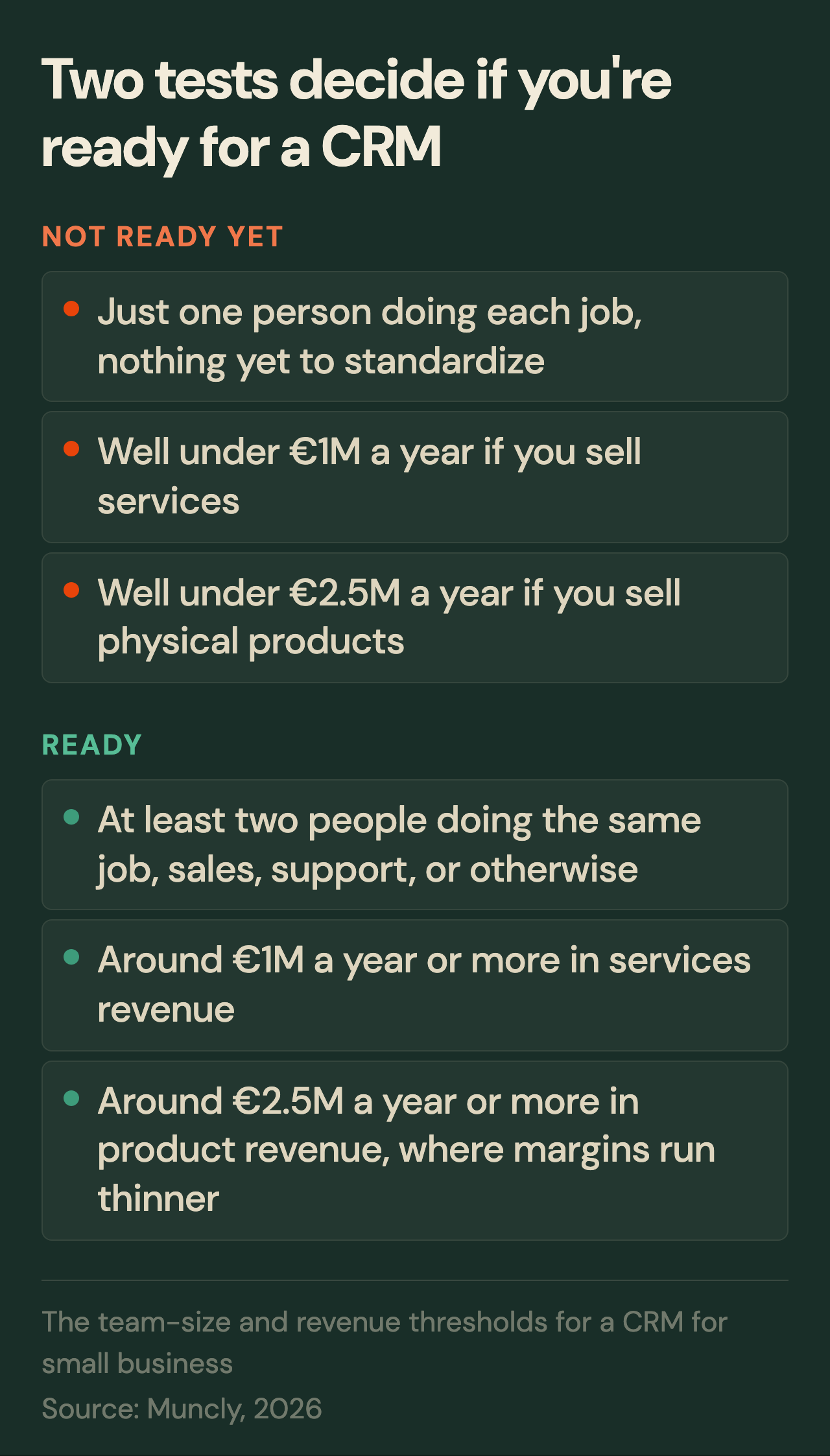
So before you start looking at CRM systems, you need to figure out whether your business has actually reached the point where a CRM starts paying off. I would look at two things: your team and your annual revenue.
Let’s start with your team. You need at least two people doing the same job. Two salespeople, two support reps, two warehouse guys. The department doesn’t really matter. What matters is that you have more than one person doing the same type of work.
You may be wondering, why two? Well, the reason is pretty simple. As soon as two people are doing the same job, they need to agree on how that job gets done. Where does the information go? Who follows up with the customer, and when? What happens at each step? Who’s responsible for what? One person doesn’t really need any of that written down. They know what they’re doing, and they just do it. Add a second person, and now you need an agreed way of doing things. That’s where a system starts to make sense.
The second thing I would look at is revenue. If you’re in services, I’d say around a million euros a year is a good ballpark. If you sell physical products and work with thinner margins, you’re probably looking at something closer to two and a half million.
Now, those aren’t magic numbers. You don’t hit a million euros and suddenly need a CRM the next morning. They’re just rough signs that your business may have reached the scale where a CRM starts making financial sense. If you’re well below those numbers, you probably don’t need a full CRM yet. You might even be able to stop reading right here. (Here is a longer look at when a CRM is not worth it yet.)
But if both boxes are checked, team size and revenue, it’s worth sticking around. Now, you might be thinking, “Come on, Jeff. That can’t be right. My buddy has three people in his company, he’s been using a CRM for years, and it works great.” Sure, that’s possible. You can absolutely run a CRM with two or three people. But the real question isn’t whether you can use one. It’s whether it actually pays for itself at that size.
Why bigger is not always better for you
Let me show you what I mean. Say you make handmade sinks. Every single one is custom, built to a specific customer’s spec. When you’re making ten sinks a month, doing everything by hand isn’t a big deal. But orders pick up. Now you need to make a hundred sinks a month instead of ten. Doing everything by hand starts getting slow and expensive. So you invest in some equipment and set up a production line.
Suddenly, you can make more sinks in the same amount of time. Your output goes up, and the cost of making each sink comes down. Sounds great. But here’s the problem. That equipment only makes sense if you’re producing enough sinks. If you only need five a month, buying, setting up, and maintaining all that machinery will probably cost you more than just making those five by hand. But once you’re making hundreds, the savings start adding up. Eventually, the investment pays for itself.
A CRM works the same way. Instead of sinks, think about deals, customers, and all the repetitive work your team does every day. The more of that work you have, the more time and money you can potentially save by helping you automate those business processes.
But there’s one more problem. Think about that production line again. Once you put production on a line, you have to standardize it. Those sinks aren’t quite as custom as they used to be. Each one starts looking like the last.
The same thing happens when you bring in a CRM. You get required fields, deal stages, rules, and processes that everyone needs to follow.
At a big enough scale, that’s a strength. But in a small company, those same standards can start getting in your way. You lose flexibility, and you can’t just bend the process for one customer or one weird situation anymore. And that flexibility is often exactly what makes a small business good at what it does. So that’s the tradeoff. As your business grows, standardization becomes more valuable. When you’re still small, a CRM can sometimes give you more process and more overhead than the time it actually saves.
A CRM is not something you set up once
There’s one more thing you should know before you commit to one. A CRM isn’t something you set up once and forget about. Or, let’s be honest, something you set up once and then stop using. Once it’s running, it needs attention. Deals, contacts, support requests, messages, and all kinds of other data are constantly moving through the system.
As the business grows, you may eventually need someone whose job is to take care of it. Someone needs to keep the data clean, make sure people are actually using the system, fix problems, update processes, and change the setup as the business changes. (Here is more on why that role matters even at a small-business size.)
And even with that person in place, you’re not off the hook. You still need to know what data matters to you, what you actually want to analyze, which reports you need, and how your process should evolve inside the system over time.
Because once people stop paying attention to the CRM, it slowly stops matching the way the business actually works. Employees start fighting it or finding ways around it. The data gets messy. And eventually, you can’t really trust the reports anymore.
And if you think I’m making this sound worse than it really is, I’ve got some bad news for you. This isn’t just something I’ve noticed. In 2025, Insightly and Ascend2 surveyed close to four hundred marketing professionals at companies with fifty to five hundred employees. They found that only thirty four percent of teams were using their CRM fully and effectively. Another fifty one percent were using it, but still struggling with internal resistance.
In other words, the work doesn’t end the moment you buy and roll out a CRM. In a lot of ways, that’s when the real work begins.
So before you go any further, ask yourself one more question. Are you ready to keep putting real time and resources into this after launch, on top of paying for it? If the answer’s no, it might be worth holding off. And if you are ready, then it’s time to ask the next question. Which CRM should you actually pick?
Where to start
At this point, I guess you probably think I’m going to tell you to just go buy HubSpot and call it a day. But I’m not going to do that. Before we get into any specific CRM recommendations, I want to give you one piece of advice you probably won’t hear from most CRM consultants. Don’t start by buying a CRM. Start with Excel. Just a plain, simple spreadsheet.
Before you spend a single dollar on software, try building the process in a spreadsheet first. Create one tab for all your incoming inquiries and another for the deals you’re actively working on. And don’t roll it out to the whole company right away. Start with two or three people and see how it works. Use that setup for a couple of weeks and pay attention to what’s actually missing.
You might realize the spreadsheet does the job just fine. Nothing falls through the cracks, your deals are easy to track, and you don’t need a CRM at all. At least not yet.
Or the opposite might happen. The spreadsheets start getting messy. Deals become harder to follow. People forget to update things. And you start wishing you had things like automatic reminders or a clear history of every conversation with a customer. Once you get to that point, you know exactly why you need a CRM and what you need it to do. And that’s a much better place to start than just picking whatever CRM everyone else seems to be using. That brings us to the obvious next question: which CRM should you choose?
Two types of CRM systems for small business
If we simplify things, you’ve really got two paths here. The easier one is to find a ready-made CRM system that’s already built for your kind of business, or for the specific process you want to automate.
Let’s say, for example, you run an auto repair shop. Instead of buying a generic CRM and configuring the entire process from scratch, you can pick a system built specifically for automotive businesses. The logic of how a shop actually runs is already baked in. So you don’t have to sit there figuring out how to make the CRM work for your business. A customer sends a request through your website, it goes straight into the system, you confirm it, assign the next step, and move the customer through a process that’s already there. Pretty simple.
Now, maybe there’s nothing built specifically for your industry. That’s fine. But if your sales process is pretty straightforward, you can look for a CRM built around the way you sell instead. Let’s say most of your business comes from individual deals. A customer comes to you with a specific need. You take them through a few clear stages, close the deal, and move on to the next one. And most of your deals follow pretty much the same path.
That’s how real estate sales work a lot of the time, or roofing companies. A lead comes in, you reach out, put together a proposal, negotiate, close the deal, and move on to the next one. If that sounds like your sales process, a CRM system like Pipedrive is probably a good fit.
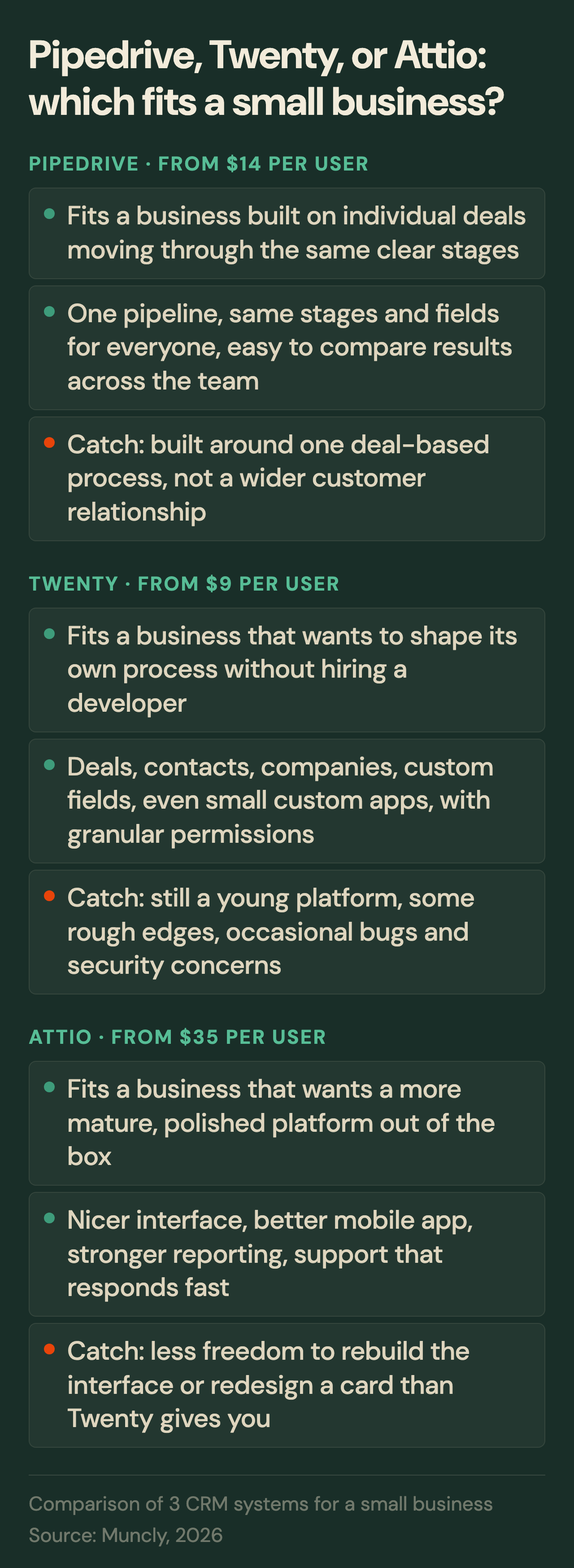
Pipedrive is built exactly for businesses that run on individual deals. You can see all your open deals in one pipeline, see what stage each deal is in, what’s already been done, and what needs to happen next. And every deal moves through the same logic. Same stages, same fields, same rules for everyone on the team. That makes it much easier to see what’s going on across your sales team and who’s responsible for what. Plus, since everything’s captured the same way, you can compare results, see where deals tend to fall apart, and build reports across your entire pipeline.
For a small business, the real advantage here is simplicity. You’re not starting with a blank page and trying to build a complicated CRM yourself. Most of the structure is already there. You adjust it to your process and start using it.
But what if your business doesn’t work like that? Maybe the relationship with your customer doesn’t end after one deal. Or maybe you have several different processes that all need to work together. That’s when a specialized CRM may not be enough. And that’s where option two comes in: CRM platforms. Unlike ready-made systems, a platform doesn’t lock you into one specific process. You get a lot more room to shape it around your business. You decide what data to store, how it connects, and which business processes get automated. Salesforce and Microsoft Dynamics fall into this category. So do two newer names, Twenty and Attio.
I’m a certified Salesforce specialist. I’ve spent years working with the platform. So I could sit here and tell you, “Just get Salesforce, you won’t regret it.” But I’m not going to do that. Because for most small businesses, I don’t think Salesforce is the right choice.
Don’t get me wrong, Salesforce is incredibly powerful. It’s been around for years. It has a huge partner ecosystem, tons of documentation, strong security, and almost endless flexibility. You can build almost any business process on Salesforce and shape it deeply around your company.
But for a small business, that power is exactly the problem. To actually use everything Salesforce can do, you need to implement it correctly, configure it properly, and keep maintaining it. That means expensive licenses, plus the cost of the people who handle all of that.
For a big company, that spend can make sense. For a small business, most of what Salesforce offers just isn’t something you need yet, which means the investment probably won’t pay for itself.
So if I were choosing a CRM platform for a small business, I’d look for the same basic idea: something you can shape around your business, without all the corporate cost and complexity. And that’s where I’d look at two platforms: Twenty and Attio.
Let’s start our overview with Twenty. Twenty is open source, but don’t let that scare you. You don’t need to touch any code. You don’t need to run it on your own server. And you don’t need to hire a developer just to get started. You can just grab the cloud subscription and use it like any other CRM.
It starts at nine dollars per user per month with annual billing. And for that price, you get probably ninety percent of what a typical small business actually needs. Want to track all your deals in one place? You can. Contacts and companies? Of course. Need custom fields or want to change your cards to better match the way your business works? You can do that too. And if you eventually need something the standard system can’t do, you can even build small custom apps inside Twenty.
One thing I really like about Twenty is how much you get for the price. Twenty lets you set granular permissions so each person only sees what they need to see, tracks user activity across the system, and comes with security features that hold up pretty well against what you’d expect from something at the Salesforce level. For nine dollars a user, that’s a lot.
But of course, there are downsides. Twenty is still a young platform, and it’s changing pretty quickly. Some parts aren’t as polished as what you’d get from a more established CRM. You may run into bugs here and there, and from time to time, there may be security concerns you need to pay attention to.
So if you don’t want to deal with any of that and you’d rather use something more established, take a look at Attio. But just keep in mind, you’re going to pay more for it. Twenty starts at nine dollars per user. With Attio, the pricing starts getting much closer to what you’d expect from the bigger CRM platforms.
What you’re really paying extra for is a more mature product. Attio feels far more polished. The interface is nicer, the mobile app is better, reporting is more developed right out of the box, and if something goes wrong, support actually responds quickly. You end up spending a lot less time thinking about the CRM itself and a lot more time just using it.
But there’s a tradeoff. That polish comes at the cost of some flexibility. You can still adapt Attio to your process, add the elements you need, and structure your data the way you want. But if you want to completely rebuild the interface or redesign how a card looks, like you can in Twenty, you won’t have nearly as much freedom to do that.
So the choice between these two really comes down to one question: what actually matters more for your business?
If you want as much flexibility as possible without spending much money, and you’re okay dealing with some of the quirks that come with a younger platform, go with Twenty. If you’d rather spend more for something more mature, polished, and easier to use day to day, go with Attio.
Do not build your own CRM
At this point, we’ve covered my main recommendations, and I could probably end the article right here. But there’s one more thing I want to talk about. Please don’t build your own CRM from scratch.
I understand why it’s tempting, especially now that AI makes building software look easier than ever. And yes, technically, you could probably get a basic CRM up and running pretty quickly. But the real problem isn’t whether you can build it. It’s what happens after.
Every line of code you write becomes your responsibility. You’ll need to maintain it, test it, update it, fix bugs, and keep it secure, forever. Think about the permissions and activity tracking we just talked about. With an existing CRM, a lot of that work has already been done for you. Build your own, and suddenly you have to decide who can see which data, who can change it, how every change gets recorded, and how you’re going to keep all of that secure. And that’s just the tip of the iceberg.
There’s one more problem, and it’s even bigger. You become dependent on whoever built the system for you. And as we all know, people change jobs and leave companies from time to time. So let’s say one day the developer who built your CRM leaves. A big part of the knowledge about how the system actually works walks out the door with them.
You might say, “Well, we’ll have documentation.” Maybe. But in all the years I’ve worked with CRM systems, I’ve rarely seen documentation that’s complete and up to date enough for a new developer to come in, read it, and understand how the whole system works.
What to do this week
I think that pretty much covers it. In this article, I tried to share everything I’d want to know if I were a small business owner choosing a CRM today. So let’s wrap this up and, more importantly, figure out what you should do next.
The biggest takeaway is pretty simple. Don’t rush out and buy a CRM just because it feels like time. Start by building your process in a simple spreadsheet. If you reach a point where that spreadsheet isn’t enough anymore, then choose a system based on how your business actually works.
Don’t chase the CRM with the most features. And don’t buy something just because it looks more serious. You don’t need the most powerful CRM out there. You need one that solves the problems you actually have.
Now it’s up to you to decide whether your business needs a CRM and, if it does, which one makes sense. If I were in your shoes, I’d set aside a little time, grab a piece of paper, sit down, and answer three questions.
First: why exactly do I need a CRM? And you need a real answer here. Not “I want to sell more” or “it’s time to automate business processes.” What’s the actual problem you’re trying to solve? Maybe you’re getting too many inbound leads and some of them are slipping through the cracks. Or maybe you’re launching a new product and need to reach out to a lot of companies, but right now you have nowhere to track any of it. If you can clearly name the problem, move on to question two: how far do I want to take this automation of my business processes?
Maybe you only need to solve one specific problem. You want every deal in one place, and you want to see what stage each one is at. In that case, something like Pipedrive may be all you need.
But maybe you want to automate more of your business processes over time. You want your leads, deals, lost-deal reasons, and other customer information in one system so you can see the whole relationship in one place. Then you’re probably looking for a more flexible platform like Twenty or Attio.
And finally, question three: am I ready to pay for all of this? And don’t just look at the price of the license. Think about implementation, setup, data migration, training your team, the time your own people will spend on it, ongoing support, and anything else you may need to build later.
There’s one rule I’d follow if I were choosing a CRM right now. Whatever number you get quoted for implementation, multiply it by pi. Call it 3.14. And I’d recommend you do the same.
That doesn’t mean you’re definitely going to spend exactly 3.14 times more. It’s just a simple way to budget for all the things that usually don’t make it into that first quote. Your team’s time. Extra configuration. Data migration. Training. Ongoing support. And sometimes even changing consultants or developers halfway through the project.
If that number still works for you, great. Keep moving forward. If it doesn’t, maybe now just isn’t the right time for a CRM.
And if you’ve gone through all of this and you’re still not sure whether you need a CRM, or which one makes sense for your business, you can book a free audit with our team. We’ll look at how your business works, help you figure out which system fits, and if you decide to move forward, help you get it up and running.